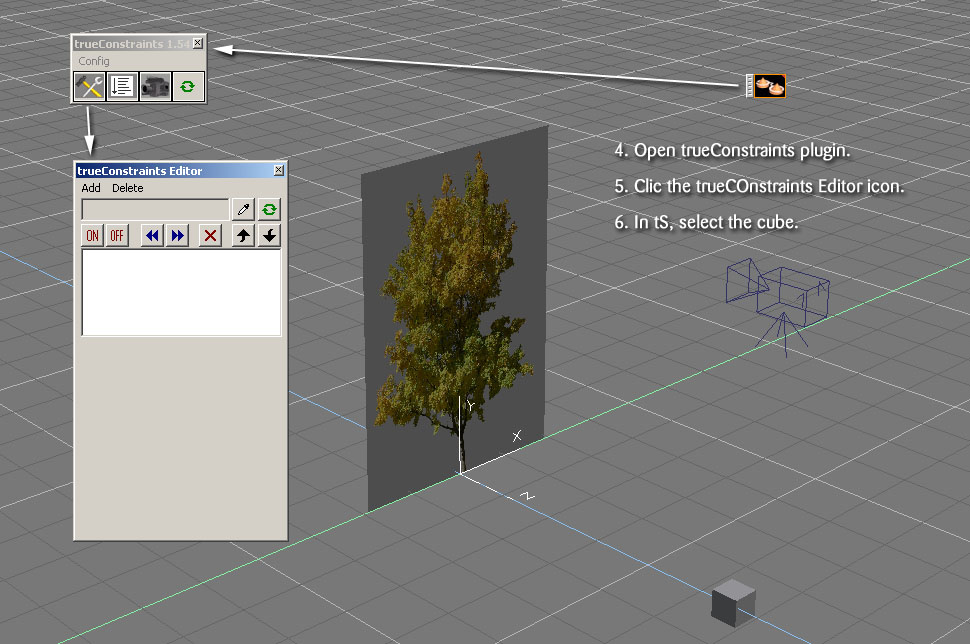
trueConstraints is a plugin made by Chikara Kojima.
It is a very powerful tool. Unfortunately, just like many other plugins, it is ignored by the community because of the lack of manuals or tutorials that tell how to use it.
I was talking last year with DesignDevil about a problem an animator may encounter when rendering a walkthrough animation. If the animator decides to use simple planes painted with a tree texture rather than 3D trees, and if the camera moves around these trees, the 2D nature of the trees will show up and break the illusion.
You may say that the animator can use the Look_At tool, to make the trees always facing the camera. It works, as long as the camera does not fly over them... as the trees would bend and pass through the ground !
Here is a trick found by DesignDevil, using trueConstraints plugin.
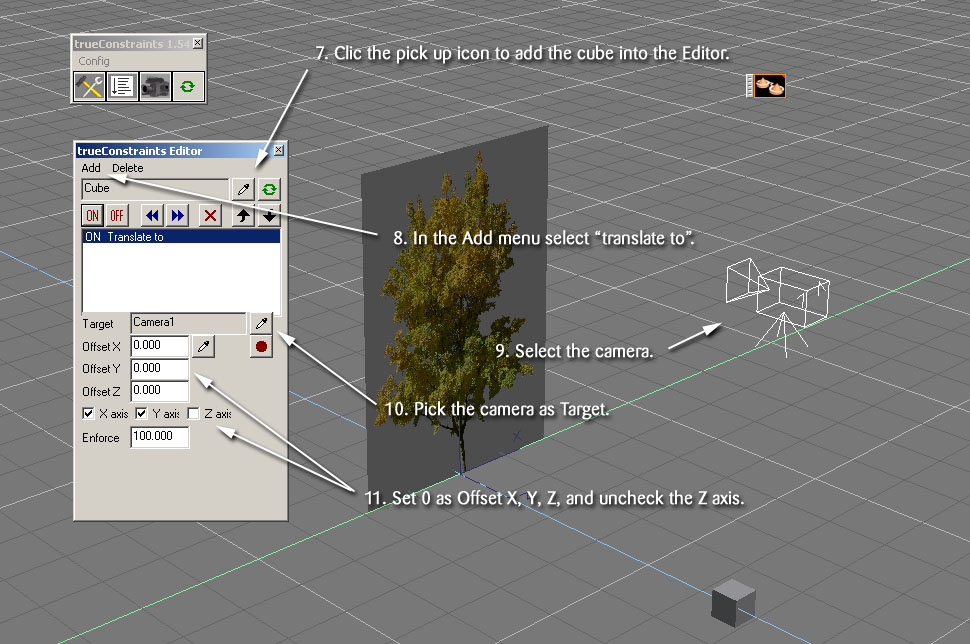
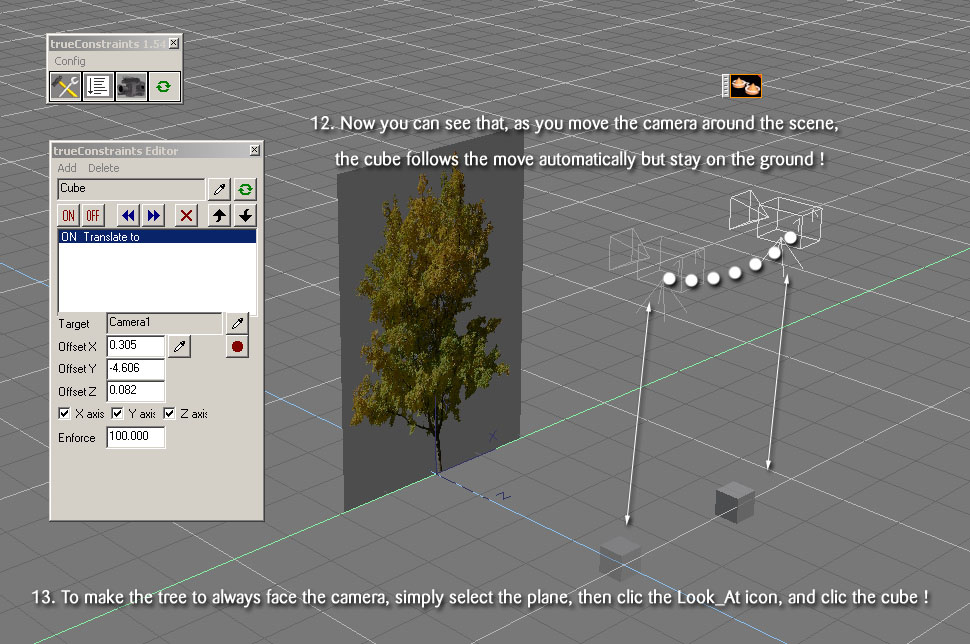
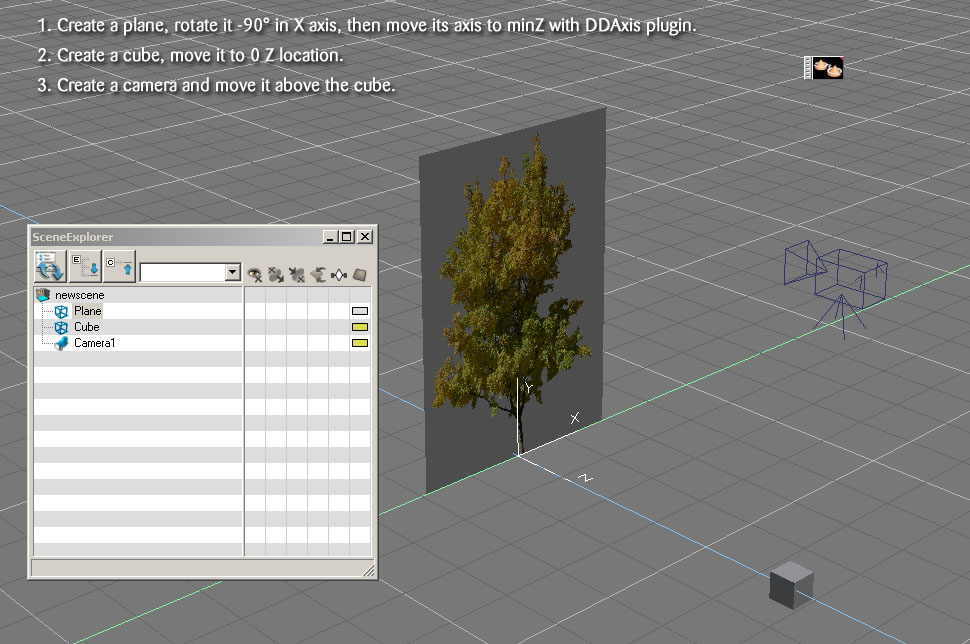
The idea is to create an object (here a cube) that will be linked both to the tree plane via the Look_At tool, and to the camera via trueConstraints.
We simply keep the tree vertical by keeping the cube location at Z 0 while the camera flies in the air.
trueConstraints tSX tutorials
-
Emmanuel
- Chief Warrant Officer
- Posts: 670
- Joined: 14 Jun 2009, 06:47
trueConstraints tSX tutorials
-
Emmanuel
- Chief Warrant Officer
- Posts: 670
- Joined: 14 Jun 2009, 06:47
Re: trueConstraints tSX tutorials
Notice that the contraints are saved with the .scn file.
So you can continue to edit your camera animation / path later, and keep the relationship between the cube and the camera ; you just have to turn on the trueConstraints plugin.
Now, try to experiment this little plugin, and add your tricks and founds on this forum thread !
You will find it on designDevil website : www.designdevil.de
So you can continue to edit your camera animation / path later, and keep the relationship between the cube and the camera ; you just have to turn on the trueConstraints plugin.
Now, try to experiment this little plugin, and add your tricks and founds on this forum thread !
You will find it on designDevil website : www.designdevil.de
-
marcel
- Captain
- Posts: 2247
- Joined: 21 May 2009, 19:52
- Type the number ten into the box: 0
- Location: paris - France
Re: trueConstraints tSX tutorials
ts_trueconstraints.rar is protected by a pw. I can't try the plugins.
Design - illustration - Animation
http://www.crea-vision.fr
-
trueBlue
- Captain
- Posts: 5548
- Joined: 06 Jul 2009, 22:50
- Type the number ten into the box: 10
Re: trueConstraints tSX tutorials
Attention: You need the following password to open the RAR file: k538s10w
-
marcel
- Captain
- Posts: 2247
- Joined: 21 May 2009, 19:52
- Type the number ten into the box: 0
- Location: paris - France
Re: trueConstraints tSX tutorials
thank! i'll try it later.
Design - illustration - Animation
http://www.crea-vision.fr
-
Emmanuel
- Chief Warrant Officer
- Posts: 670
- Joined: 14 Jun 2009, 06:47
Re: trueConstraints tSX tutorials
I think this RAR password also unlocks the 60 frames recording limit when running the plugin.
-
bitkar
- Captain
- Posts: 2089
- Joined: 16 Mar 2010, 07:14
- Type the number ten into the box: 0
- Location: Czech Republic
Re: trueConstraints tSX tutorials
nice trick... chikira had one of best plugins, really a smart guy. He would be valuable to us if he participated in this forum.
Michal aka bitkar
tS freak since tS2 (1998) and forever (tS7.61 modeler)