Physical simulation - dropping, but not bouncing - using 6.6
-
davidjohnson
- Petty Officer Third Class
- Posts: 18
- Joined: 30 May 2009, 13:28
Physical simulation - dropping, but not bouncing - using 6.6
I want to drop a LOGO onto a plane, but I want it to just drop and teeter - almost like dropping an anvil, but not spin or fall over. How can I go about this?
-
froo
- Captain
- Posts: 2554
- Joined: 22 May 2009, 12:13
Re: Physical simulation - dropping, but not bouncing - using 6.6
Hi David.
To avoid the bouncing, you can reduce the Elasticity of your logo.
In Workspace side of 7.61 you can constrain the physics sim to run in a 2D plane
by selecting one of the radio buttons: XZ, YZ, or XY. I do not know if there is an equivalent
option in Model / 6.6.
One thing you could do, is remove the rotation keyframes in the undesired axes after running your simulation. But
be careful to retain the rotation keyframes you want: the rotation (teetering) in the axis/plane you want.
To avoid the bouncing, you can reduce the Elasticity of your logo.
In Workspace side of 7.61 you can constrain the physics sim to run in a 2D plane
by selecting one of the radio buttons: XZ, YZ, or XY. I do not know if there is an equivalent
option in Model / 6.6.
One thing you could do, is remove the rotation keyframes in the undesired axes after running your simulation. But
be careful to retain the rotation keyframes you want: the rotation (teetering) in the axis/plane you want.
-
davidjohnson
- Petty Officer Third Class
- Posts: 18
- Joined: 30 May 2009, 13:28
Re: Physical simulation - dropping, but not bouncing - using 6.6
yeah, I don't see how to constrain using 6.6 - there is no XY panel with the simulation that I can see...
-
Finis

- Captain
- Posts: 5410
- Joined: 21 May 2009, 18:26
- Type the number ten into the box: 0
- Location: America!
Re: Physical simulation - dropping, but not bouncing - using 6.6
Low elasticity should make a collision like balls of clay. High elasticity should be like pool (billiard) balls.
I've had some luck in 6.6/modelside physics using adhesion to stop unwanted movement but the perpetual spinning has baffled me. Remember how things spun with my Splododyne Explodiatory Explodolator?
I'll be interested too if any can tell how do the drop David wants.
I've had some luck in 6.6/modelside physics using adhesion to stop unwanted movement but the perpetual spinning has baffled me. Remember how things spun with my Splododyne Explodiatory Explodolator?
I'll be interested too if any can tell how do the drop David wants.
Last edited by Finis on 09 Sep 2009, 21:52, edited 1 time in total.
I prefer dangerous freedom over peaceful servitude. -- Thomas Jefferson/Jean Jacques Rousseau
-
spacekdet

- Captain
- Posts: 1810
- Joined: 27 May 2009, 15:00
- Type the number ten into the box: 10
- Location: On the day shift at the Utility Muffin Research Kitchen
Re: Physical simulation - dropping, but not bouncing - using 6.6
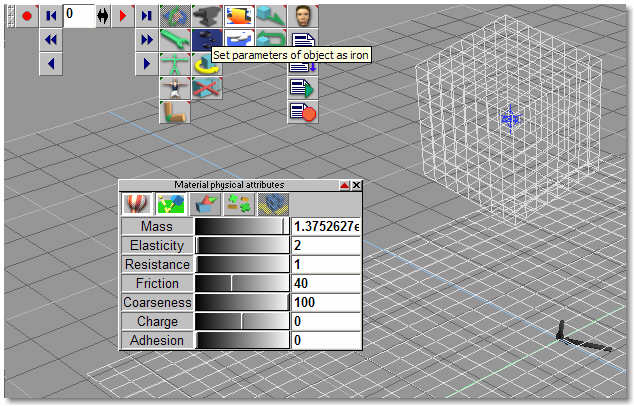
I might be 'late to the party', but...have you 'set parameters of object as iron'?
Oddly enough, it's got an anvil on the icon!
Right click that icon and adjust the Elasticity down, and the mass up.
Tip: right click the sliders to get a numerical input panel.
Rotate the object slightly before you start the simulation.
Set parameters on both the logo and the ground plane.
Oddly enough, it's got an anvil on the icon!
Right click that icon and adjust the Elasticity down, and the mass up.
Tip: right click the sliders to get a numerical input panel.
Rotate the object slightly before you start the simulation.
Set parameters on both the logo and the ground plane.
-
Finis
- Captain
- Posts: 5410
- Joined: 21 May 2009, 18:26
- Type the number ten into the box: 0
- Location: America!
Re: Physical simulation - dropping, but not bouncing - using 6.6
If the ground plane object has incredible mass then it could absorb much of the energy from other objects without noticeable movement.spacekdet wrote:...and the mass up.
I prefer dangerous freedom over peaceful servitude. -- Thomas Jefferson/Jean Jacques Rousseau