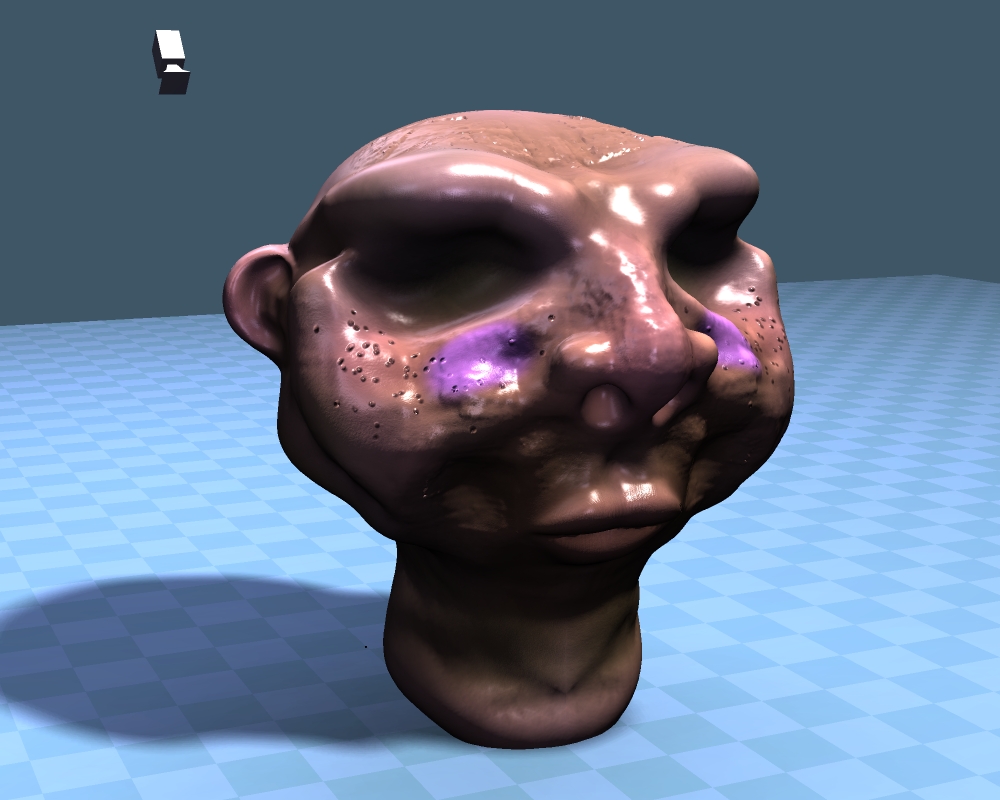
This is what I quickly made in a half hour from the get go with Sculptris. I also exported everything into TS quite easily and played with the lights a little.
I think with TS you still need to keep the polymesh at a lower quality. But considering 128880 polygons at 4 frames a second with an integrated ATI Radeon HD 5290 (700mg vid RAM) intergrated card on my asus board... And with too high shadow maps of 6000 by 5 lights, it wasn't bad.
Sculptris is fantastic, and uber easy! You can download it here --> http://www.pixologic.com/sculptris/
The interface is easy, the navigation and tools is really easy. Exporting was perfect and also easy. It's a very easy program. =)
My only critic would be that you can't layer details, mesh quality, or paint layers. I use layers a lot, be it in 2D or 3D, so I found the program a little bit limited in that regard. But for a free program, it is perfect.
Scluptris Experiments with TS
-
Draise

- Captain
- Posts: 3200
- Joined: 21 Sep 2009, 19:33
- Type the number ten into the box: 0
- Location: Bogota, Colombia
Scluptris Experiments with TS
- Attachments
-
-
Finis

- Captain
- Posts: 5410
- Joined: 21 May 2009, 18:26
- Type the number ten into the box: 0
- Location: America!
Re: Scluptris Experiments with TS
Steinie likes Sculptris and has done several characters with it. I hope he can get back to the forum soon.
I prefer dangerous freedom over peaceful servitude. -- Thomas Jefferson/Jean Jacques Rousseau
-
Steinie

- Captain
- Posts: 2958
- Joined: 21 May 2009, 17:38
- Type the number ten into the box: 10
Re: Scluptris Experiments with TS
Finis,
Well I didn't really go anywhere I'm just spending my time doing other hobbies...(gardening, electronics, sound systems, sports etc)
This is the time of year I usually get back to creating 3D work. I'm back!!!
Draise,
The last three images all were created using Sculptris.
vi ... f=32&t=530"
I love that program and it is more intuitive than using ZBrush. (Although ZBrush can take your model to the next level of detail).
I just wish you could import Sculptris or ZBrush models directly into any animation program without modification.
Well I didn't really go anywhere I'm just spending my time doing other hobbies...(gardening, electronics, sound systems, sports etc)
This is the time of year I usually get back to creating 3D work. I'm back!!!
Draise,
The last three images all were created using Sculptris.
vi ... f=32&t=530"
I love that program and it is more intuitive than using ZBrush. (Although ZBrush can take your model to the next level of detail).
I just wish you could import Sculptris or ZBrush models directly into any animation program without modification.
-
pugman 1
- Captain
- Posts: 1555
- Joined: 21 May 2009, 19:26
- Type the number ten into the box: 0
- Location: Germany
Re: Scluptris Experiments with TS
Hi,you can import the sculptris or zbrush models into blender and
rig them there no prb .i rigged my mosi in 5 mins and it worked perfect.
Nice to see you back Steinie
rig them there no prb .i rigged my mosi in 5 mins and it worked perfect.
Nice to see you back Steinie
-
Tiles

- Master Chief Petty Officer
- Posts: 401
- Joined: 27 May 2009, 08:34
Re: Scluptris Experiments with TS
It`s just no good idea. Not just because of the high polycount. Also the meshflow can make trouble with animation. The non existent edgeloop may deform where you don`t want the mesh to deform. You better retopo your mesh for animation. Gives you also a better performance. Blender can do retopoHi,you can import the sculptris or zbrush models into blender and
rig them there no prb

Free Gamegraphics, Freeware Games http://reinerstilesets.de
-
Draise
- Captain
- Posts: 3200
- Joined: 21 Sep 2009, 19:33
- Type the number ten into the box: 0
- Location: Bogota, Colombia
Re: Scluptris Experiments with TS
Steinie wrote:Finis,
Well I didn't really go anywhere I'm just spending my time doing other hobbies...(gardening, electronics, sound systems, sports etc)
This is the time of year I usually get back to creating 3D work. I'm back!!!
Draise,
The last three images all were created using Sculptris.
vi ... f=32&t=530"
I love that program and it is more intuitive than using ZBrush. (Although ZBrush can take your model to the next level of detail).
I just wish you could import Sculptris or ZBrush models directly into any animation program without modification.
VERY NICE STUFF... You have quite a knack for geometry! I'm a bit slow when it comes to good models!!
-
BNG

- Chief Warrant Officer
- Posts: 684
- Joined: 16 Oct 2009, 03:26
- Type the number ten into the box: 0
- Location: Texas
Re: Scluptris Experiments with TS
Actually, the model is very cool and you shouldn't be so hard on yourself. Keep on modden Draise!Draise wrote:Steinie wrote:Finis,
Well I didn't really go anywhere I'm just spending my time doing other hobbies...(gardening, electronics, sound systems, sports etc)
This is the time of year I usually get back to creating 3D work. I'm back!!!
Draise,
The last three images all were created using Sculptris.
vi ... f=32&t=530"
I love that program and it is more intuitive than using ZBrush. (Although ZBrush can take your model to the next level of detail).
I just wish you could import Sculptris or ZBrush models directly into any animation program without modification.
VERY NICE STUFF... You have quite a knack for geometry! I'm a bit slow when it comes to good models!!
Casual Truespace 3D modeling hobbyist. My Truespace blog and simple 3d Modeling Tutorials for Casual Model Makers.
-
Draise
- Captain
- Posts: 3200
- Joined: 21 Sep 2009, 19:33
- Type the number ten into the box: 0
- Location: Bogota, Colombia
Re: Scluptris Experiments with TS
lol, i'll try not too hard to be hard on myself, good advice =P
-
pugman 1
- Captain
- Posts: 1555
- Joined: 21 May 2009, 19:26
- Type the number ten into the box: 0
- Location: Germany
Re: Scluptris Experiments with TS
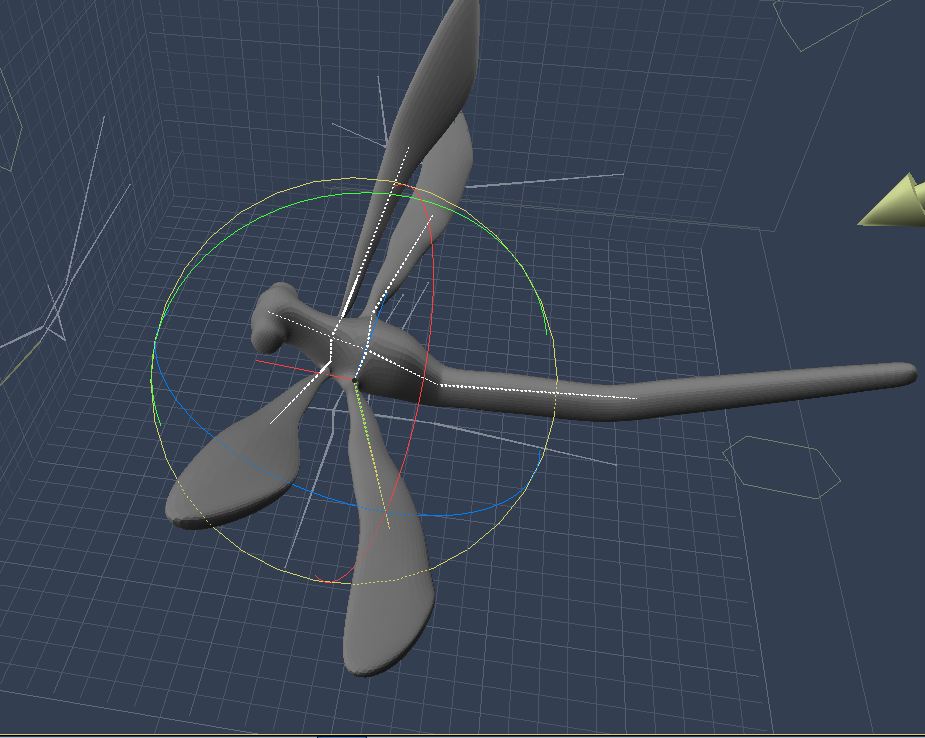
Ok Here is a model direct from blender in carrera with working bone system.
the model was made in z brush and imported into blender for rigging and then into
carrera .it also works in vue .can be animated in all three apps no prob
the model was made in z brush and imported into blender for rigging and then into
carrera .it also works in vue .can be animated in all three apps no prob
- Attachments
-
-
Draise
- Captain
- Posts: 3200
- Joined: 21 Sep 2009, 19:33
- Type the number ten into the box: 0
- Location: Bogota, Colombia
Re: Scluptris Experiments with TS
Nice nice! I REALLY NEED TO GET INTO VUE AND BLENDER! I hear so much good of those programs, and I have played with Vue and fell in love!
..... But cause of work I can only focus on Softimage and a few other programs that are easy to learn (eg. TS, lol!) Eventually...
Are you gonna animate the dragonfly? Wot's it for?
..... But cause of work I can only focus on Softimage and a few other programs that are easy to learn (eg. TS, lol!) Eventually...
Are you gonna animate the dragonfly? Wot's it for?
-
pugman 1
- Captain
- Posts: 1555
- Joined: 21 May 2009, 19:26
- Type the number ten into the box: 0
- Location: Germany
Re: Scluptris Experiments with TS
No.It for jeffroig animation film .i just wanted to show that it is
possible to make somthing in z brush and rig it in blender
so it works
possible to make somthing in z brush and rig it in blender
so it works
-
Draise
- Captain
- Posts: 3200
- Joined: 21 Sep 2009, 19:33
- Type the number ten into the box: 0
- Location: Bogota, Colombia
Re: Scluptris Experiments with TS
Ah yes, it is possible indeed! Zbrush also does re-topology, so you can reduce the polycount and polygonize it all if needed, as far as I know (don't ask me how!). I do the same with Mudbox and other high detail meshes. I usually keep the high detail as only a Normal Map and export a lower detail mesh, or even make a "game quality" type mesh to sculpt on initially, thus only making normal maps and specular maps, and texture maps without sacrificing polygon counts.
Kind of did it for my tree WIP here --> vi ... f=5&t=3085
Kind of did it for my tree WIP here --> vi ... f=5&t=3085