Hello all,
I am full of questions. So I am rendering a picture to .PNG through Lightworks. I have it setup to read a file for background and it is just a clear white image. But when I pull up the picture after I render, it is showing a transparent background.
Is there an option somewhere to turn on/off the transparency on the background? What am I missing on this one?
.PNG Render with a Transperant background.
-
Karthogen
- Master Chief Petty Officer
- Posts: 454
- Joined: 03 Jun 2009, 14:12
.PNG Render with a Transperant background.
-
spacekdet

- Captain
- Posts: 1810
- Joined: 27 May 2009, 15:00
- Type the number ten into the box: 10
- Location: On the day shift at the Utility Muffin Research Kitchen
Re: .PNG Render with a Transperant background.
-
MikeNTX

- Petty Officer Second Class
- Posts: 24
- Joined: 22 May 2009, 00:09
- Type the number ten into the box: 0
- Location: Texas
Re: .PNG Render with a Transperant background.
Wait am I misreading this? Is it possible to do a render and have a transparent background in an image file? I do have a need for this on something I am working on now.
-
spacekdet
- Captain
- Posts: 1810
- Joined: 27 May 2009, 15:00
- Type the number ten into the box: 10
- Location: On the day shift at the Utility Muffin Research Kitchen
Re: .PNG Render with a Transperant background.
Yes, it's possible to do either transparent (32 bit) or non-transparent (24 bit).
When rendering to file type PNG, a panel will pop up allowing you to pick either 24 bit or 32 bit:
The result:
If you prefer, you can also render to PSD format and get even more options:
When rendering to file type PNG, a panel will pop up allowing you to pick either 24 bit or 32 bit:
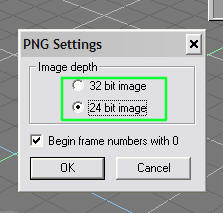
- transp_bg_1_minitut.jpg (11.93 KiB) Viewed 4328 times


- rndr2file_psd_minitut.jpg (19.92 KiB) Viewed 4319 times
-
MikeNTX
- Petty Officer Second Class
- Posts: 24
- Joined: 22 May 2009, 00:09
- Type the number ten into the box: 0
- Location: Texas
Re: .PNG Render with a Transperant background.
That does work thank you so much