http://www.zbrushcentral.com/showthread ... ge=1&pp=15"
Interesting development, and a great compliment for the developer.
Normally, this kind of thing would annoy me, but I don't have the same sense of foreboding that I did when truespace was acquired by $atan. In fact I think it could be a very good thing for Sculptris.
Anyway, we'll see.
Pixelogic acquire Sculptris
-
Benji
- Senior Chief Petty Officer
- Posts: 280
- Joined: 22 May 2009, 01:23
Pixelogic acquire Sculptris
-
Prodigy

- Site Admin
- Posts: 957
- Joined: 21 May 2009, 14:46
- Type the number ten into the box: 0
- Location: Uruguay
Re: Pixelogic acquire Sculptris
Sculptris is quite good to be free, good enough to make people desist to buy zbrush..
I bet they will discontinued it in a few months..
I bet they will discontinued it in a few months..
๑۩۞۩๑ prodigy ๑۩۞۩๑
-
froo
- Captain
- Posts: 2554
- Joined: 22 May 2009, 12:13
Re: Pixelogic acquire Sculptris
heh Double Click to run it, Crash.
-
Benji
- Senior Chief Petty Officer
- Posts: 280
- Joined: 22 May 2009, 01:23
Re: Pixelogic acquire Sculptris
I'm not sure they will.I bet they will discontinued it in a few months..
It actually makes sense to have a cheap, easy to use application to sway people from using open source apps or 3dcoat etc. PL have made a new forum for it as well.
-
splinters
- Chief Warrant Officer
- Posts: 733
- Joined: 21 May 2009, 18:55
- Type the number ten into the box: 0
Re: Pixelogic acquire Sculptris
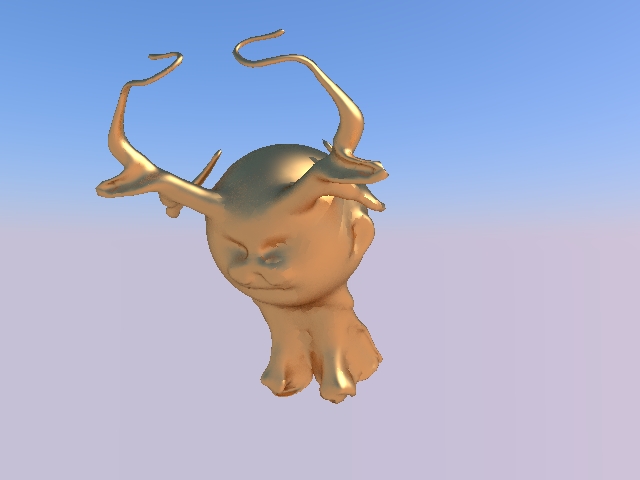
Wow, what a great app. I have never really used paint/brush based modelling as I don't like too much intricate detail on my characters (last one I tried was Mudbox) but I just had a play with this and made this head in around 10 mins. Imported it to TS, added some stock eyes, hood and eyebrows and voila. Very intuitive and quite powerful...I may well use this.
Admittedly, the image is not great...but c'mon, 10 minutes!! Anyone who knows my style and speed of working will know why I like this app...
Admittedly, the image is not great...but c'mon, 10 minutes!! Anyone who knows my style and speed of working will know why I like this app...
- Attachments
-

-
RAYMAN

- Captain
- Posts: 2547
- Joined: 21 May 2009, 18:56
Re: Pixelogic acquire Sculptris
What is much different to all the other sculpting programs like Mudbox and Zbrush and 3d coat is that it doesnt have an overwhelming amount of features
and a mindboggling interface, its simple to use and powerfull. Pixologic better keep it that way !Its a real alternative.I would just ad an image painter thats all.Something like image ink (modo)or that 3d coat has to paint onto the surface with a picture.
and a mindboggling interface, its simple to use and powerfull. Pixologic better keep it that way !Its a real alternative.I would just ad an image painter thats all.Something like image ink (modo)or that 3d coat has to paint onto the surface with a picture.
-
Benji
- Senior Chief Petty Officer
- Posts: 280
- Joined: 22 May 2009, 01:23
Re: Pixelogic acquire Sculptris
You can do something like this in sculptris with projection painting. You have to save as a psd and go back and forth between photoshop, so it's not as good, but it seems to work. Unfortunately, it doesn't seem to work with gimp or any other non-PS app that I've tried.
-
RAYMAN
- Captain
- Posts: 2547
- Joined: 21 May 2009, 18:56
Re: Pixelogic acquire Sculptris
Ok thanks for the info good to know !Benji wrote:You can do something like this in sculptris with projection painting. You have to save as a psd and go back and forth between photoshop, so it's not as good, but it seems to work. Unfortunately, it doesn't seem to work with gimp or any other non-PS app that I've tried.
Peter
-
tamtam

- Petty Officer First Class
- Posts: 43
- Joined: 26 Aug 2009, 19:13
Re: Pixelogic acquire Sculptris
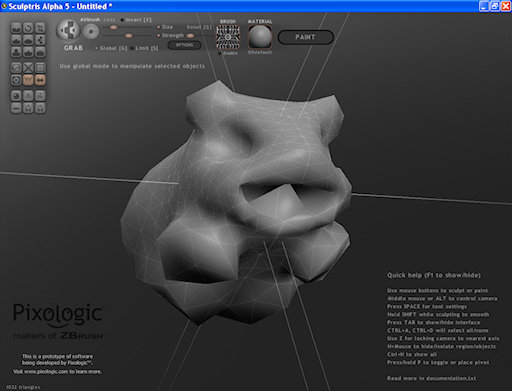
At my first real attempt after downloading Sculptris, I made a guineapig (rodent), and I didn't paint it in Sculptris because the back of the mesh was too low-polygon to pull out some feet or more of the legs, but it's a start. I wanted it to be low-polygon, so I could use it in a 3d game someday, maybe. Sculptris crashed on me when I went too high with the ammount of polygons, before I made the guineapig, and that's when I was testing it out, trying to get a feel for how to use it. And I thought my computer was very good for high ammounts of polygons and other graphics. Yet again, I don't know all the specifics of the hardware of my computer. Maybe it's outdated by now, since technology advances fast.
Anyway, here is an image of my guinea pig in Sculptris:
Anyway, here is an image of my guinea pig in Sculptris:
- Attachments
-

- My low-polygon Sculptris Guinea Pig, which I made from a sphere.
-
JimB
- Chief Petty Officer
- Posts: 114
- Joined: 21 May 2009, 20:34
Re: Pixelogic acquire Sculptris
tamtam it would be best to go to as high a resolution as you need for best definition and after retopolise to the resolution you want for games.
-
JimB
- Chief Petty Officer
- Posts: 114
- Joined: 21 May 2009, 20:34
Re: Pixelogic acquire Sculptris
A few people are reporting crashes on startup,its worth taking a look at the Sculptris support forum for possible solutions.froo wrote:heh Double Click to run it, Crash.
http://drpetter.proboards.com/index.cgi ... thread=900"
-
froo
- Captain
- Posts: 2554
- Joined: 22 May 2009, 12:13
Re: Pixelogic acquire Sculptris
Ah yes thank you Jim. I was considering this possibility; I have an ATI card and have had issues with blender in the past. I will try copying the ATI GL driver from the blender folder into the Sculptris folder, to see if that helps.
-
RAYMAN
- Captain
- Posts: 2547
- Joined: 21 May 2009, 18:56
Re: Pixelogic acquire Sculptris
I also get some bad crashes both when I try to import triangulated meshes from outside and if the poly count gets higher something like 200000 and when I thenJimB wrote:A few people are reporting crashes on startup,its worth taking a look at the Sculptris support forum for possible solutions.froo wrote:heh Double Click to run it, Crash.
http://drpetter.proboards.com/index.cgi ... thread=900"
switch to paint mode.
They got to still work on this but its not bad what it does it does well.... a good base to build upon !
Peter
-
marcel

- Captain
- Posts: 2247
- Joined: 21 May 2009, 19:52
- Type the number ten into the box: 0
- Location: paris - France
Re: Pixelogic acquire Sculptris
A lot of 3d sculpting soft appears since a few years.
I think this kind of software would be really good if we could use it on a tactile screen with multi touch tools.
I think this kind of software would be really good if we could use it on a tactile screen with multi touch tools.
Design - illustration - Animation
http://www.crea-vision.fr
http://www.crea-vision.fr
-
marcel
- Captain
- Posts: 2247
- Joined: 21 May 2009, 19:52
- Type the number ten into the box: 0
- Location: paris - France
Re: Pixelogic acquire Sculptris
Do you know curvy 3d?
instead to use ball as the base of the sculptur, it use freehand curve and export .obj with quad. No need hight poly if you use SDS with TS.
You can test it here:
http://www.curvy3d.com/download.html
instead to use ball as the base of the sculptur, it use freehand curve and export .obj with quad. No need hight poly if you use SDS with TS.
You can test it here:
http://www.curvy3d.com/download.html
Design - illustration - Animation
http://www.crea-vision.fr
http://www.crea-vision.fr
-
Benji
- Senior Chief Petty Officer
- Posts: 280
- Joined: 22 May 2009, 01:23
Re: Pixelogic acquire Sculptris
I remember reading that others have had issues importing models, hopefully this will get some love in the future. My pc is fairly weak and I have no issues with models of 1 million plus polys, but that's starting from the clay sphere, I haven't tried importing anything.
-
marcel
- Captain
- Posts: 2247
- Joined: 21 May 2009, 19:52
- Type the number ten into the box: 0
- Location: paris - France
Re: Pixelogic acquire Sculptris
Issues to import millions of polys is the problem of TS. I tried to import low (and more) quad from Curvy to TS without problem. I use the standard .obj importer (luuv) on the model side. TS can import map and texture made with Curvy. Objects created by most of sculpting soft are too complex for TS and if you reduce the numbers of triangles, the result is not very good. That is why quad and sds is a good solution for TS. But Curvy seem to have not enought tools. Maybe the next version will be a good soft to work with TS.
Design - illustration - Animation
http://www.crea-vision.fr
http://www.crea-vision.fr
-
fahembree
- Chief Petty Officer
- Posts: 108
- Joined: 22 May 2009, 02:28
Re: Pixelogic acquire Sculptris
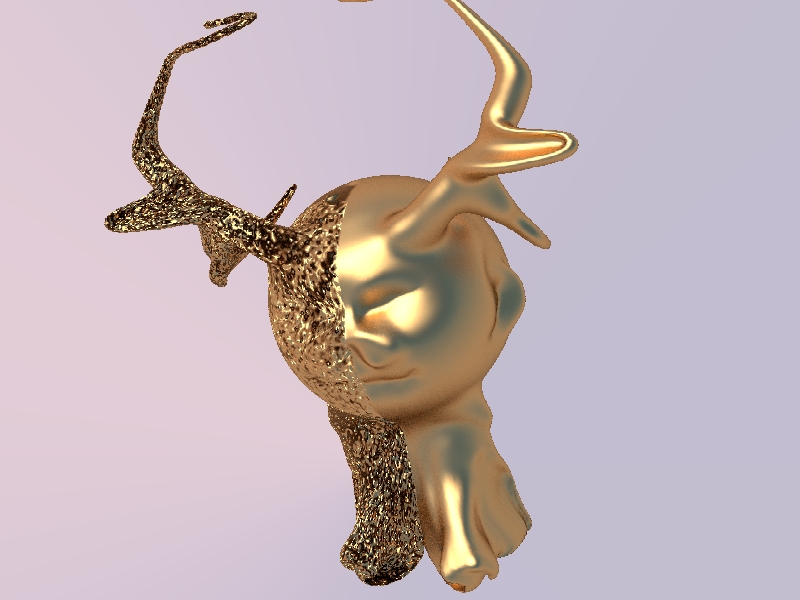
I tried it and its fun to play around with but I quickly found out the poly count overloads TS and its hard to manipulate the object is TS. I exported it (3ds) to try and render in Kerkythea but there seems to be a problem in the 3ds export, It rendered ok in TS, but only half in kerkythea.
- Attachments
-
-
fahembree
- Chief Petty Officer
- Posts: 108
- Joined: 22 May 2009, 02:28
Re: Pixelogic acquire Sculptris
There is a reduce selction and also a subdivide command/icons in sculptris so you can reduce the poly count befoe exporting to an obj file.fahembree wrote:I tried it and its fun to play around with but I quickly found out the poly count overloads TS and its hard to manipulate the object is TS. I exported it (3ds) to try and render in Kerkythea but there seems to be a problem in the 3ds export, It rendered ok in TS, but only half in kerkythea.
I reduced the poly count in Sculptris before saving the object with about 10 clicks of mouse and exported and opened in TS and it lost very little shape and it was then easy to manulipate in TS, I also tried the export to 3ds and again rendered it in Kerkythea and it rendered fine. Must have been a memory limit problem the first time. Below is a render in Kerk.
- Attachments
-