Hey folks. I have a question for the Sculptris users.
What is your typical process for creating eye sockets and eye socket ridges, cheek bones underneath,etc.?
Is there a particular order in which you use the tools?
thanks!
sculptris: eye sockets, non-circular editing
-
froo
- Captain
- Posts: 2554
- Joined: 22 May 2009, 12:13
sculptris: eye sockets, non-circular editing
-
Steinie

- Captain
- Posts: 2958
- Joined: 21 May 2009, 17:38
- Type the number ten into the box: 10
Re: sculptris: eye sockets, non-circular editing
The very beginning of this video shows the artist using the "inflate" tool (actually the deflate tool which is Ctrl key + "inflate") Use "Inflate" or "Draw" to add underline bone structure. This is how I do it.
http://www.youtube.com/watch?v=4_5Etz6d ... re=related"
Now if you really want to see some good stuff then watch Ryan Kittleson's "Daily Caricature Speed Modeling Tutorials" on the right side of the screen. This is one of my favorite modeling artist. He also teaches 3D modeling at a school. He is very good and I love his techniques.
http://www.youtube.com/playlist?list=PL91B0981E0E4D3FD7"
-
froo
- Captain
- Posts: 2554
- Joined: 22 May 2009, 12:13
Re: sculptris: eye sockets, non-circular editing
Excellent thank you very much Steinie! 
-
Steinie
- Captain
- Posts: 2958
- Joined: 21 May 2009, 17:38
- Type the number ten into the box: 10
Re: sculptris: eye sockets, non-circular editing
Froo, I corrected my second link I wanted you to check out. This is really good stuff to watch and learn.
I believe in the Caricature Modeling videos he was utilizing ZBrush, however his tools are the same as in Sculptris. Once you know what each tool in Sculptris can do it will be easier to duplicate his workflow.
-
froo
- Captain
- Posts: 2554
- Joined: 22 May 2009, 12:13
Re: sculptris: eye sockets, non-circular editing
Excellent thank you Steinie. I was looking for some good tutorials on Sculptris.
-
Steinie
- Captain
- Posts: 2958
- Joined: 21 May 2009, 17:38
- Type the number ten into the box: 10
Re: sculptris: eye sockets, non-circular editing
Sculptris Cheat Sheet:
http://members.casema.nl/jw.v.dronkelaa ... _sheet.pdf"
Sculptris Primer:
http://vimeo.com/12186535"
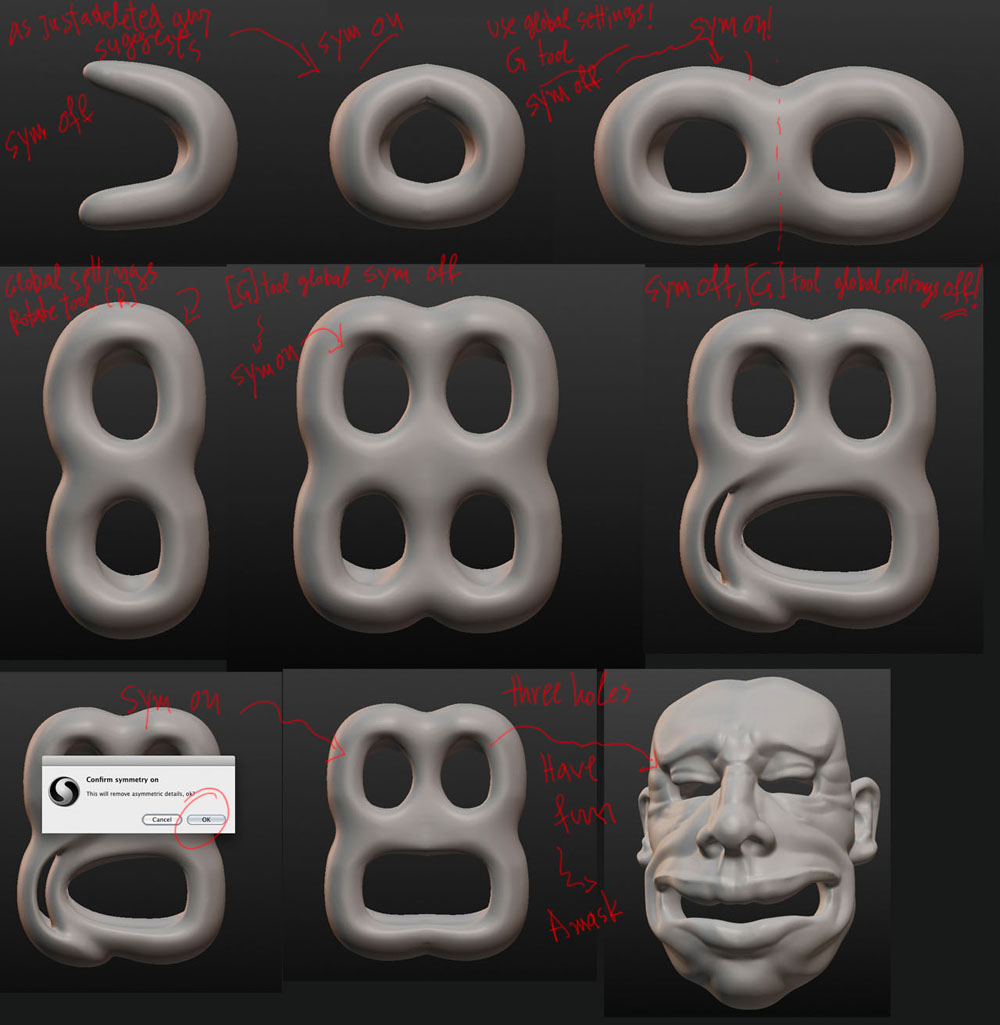
Attachment: How to create donuts or holes using Sculptris
Sculptris and Daz Studio
http://www.zbrushcentral.com/showthread ... deo+thread"
- Attachments
-
-
froo
- Captain
- Posts: 2554
- Joined: 22 May 2009, 12:13
Re: sculptris: eye sockets, non-circular editing
COOL! I may have to study that writing for a few minutes though; got most of it.