This script simulates the press of the control button for making selections in the link editor.
Press the button to start. As you select items their selection is toggled so you can click to add to the selection or select again to remove from the selection. Press the button again to stop the simulator.
Find it here 4th from the top:
http://www.clintons3d.com/plugins/trues ... index.html"
CTRL button simulator
-
clintonman

- Captain
- Posts: 5659
- Joined: 21 May 2009, 21:08
- Type the number ten into the box: 0
- Location: California
CTRL button simulator
-
Draise

- Captain
- Posts: 3200
- Joined: 21 Sep 2009, 19:33
- Type the number ten into the box: 0
- Location: Bogota, Colombia
Re: CTRL button simulator
WOW Awesome! This is what the LE lacked. I'm very glad you're actively improving this stuff! Thank you.
I wonder if you can assign a key+mouse combination to the button, so you can literally hold down CTRL and select.
I wonder if you can assign a key+mouse combination to the button, so you can literally hold down CTRL and select.
-
clintonman
- Captain
- Posts: 5659
- Joined: 21 May 2009, 21:08
- Type the number ten into the box: 0
- Location: California
Re: CTRL button simulator
I don't know if that's possible. You can use widgets to do that sort of thing, but the LE has no widget control that I can find. It's like a closed box with no way in.Draise wrote:WOW Awesome! This is what the LE lacked. I'm very glad you're actively improving this stuff! Thank you.
I wonder if you can assign a key+mouse combination to the button, so you can literally hold down CTRL and select.
-
MikomDude

- Captain
- Posts: 1930
- Joined: 04 Oct 2010, 11:12
- Type the number ten into the box: 0
- Location: The Hague, Netherlands
Re: CTRL button simulator
This look cool!
Hmm, though I always found the Workspace lacked a box select tool (Ctrl + Hold Left Mouse Button and drag a box around a set of objects), like in the modelside. Having to hold Ctrl to select everything manually or using the link editor to select everything just doesn't quite work fast enough for me.
Hmm, though I always found the Workspace lacked a box select tool (Ctrl + Hold Left Mouse Button and drag a box around a set of objects), like in the modelside. Having to hold Ctrl to select everything manually or using the link editor to select everything just doesn't quite work fast enough for me.
-
trueBlue

- Captain
- Posts: 5548
- Joined: 06 Jul 2009, 22:50
- Type the number ten into the box: 10
Re: CTRL button simulator
Nice! Are you planing PE selectons too?
Thanks Clinton!
Thanks Clinton!
-
clintonman
- Captain
- Posts: 5659
- Joined: 21 May 2009, 21:08
- Type the number ten into the box: 0
- Location: California
Re: CTRL button simulator
I don't understand. PE selections already have ctrl button behavior.trueBlue wrote:Nice! Are you planing PE selectons too?
Thanks Clinton!
-
clintonman
- Captain
- Posts: 5659
- Joined: 21 May 2009, 21:08
- Type the number ten into the box: 0
- Location: California
Re: CTRL button simulator
Did you try my Rectangle/Lasso select script? It's further down on the same page.MikomDude wrote:This look cool!
Hmm, though I always found the Workspace lacked a box select tool (Ctrl + Hold Left Mouse Button and drag a box around a set of objects), like in the modelside. Having to hold Ctrl to select everything manually or using the link editor to select everything just doesn't quite work fast enough for me.
-
MikomDude
- Captain
- Posts: 1930
- Joined: 04 Oct 2010, 11:12
- Type the number ten into the box: 0
- Location: The Hague, Netherlands
Re: CTRL button simulator
I remember seeing it, however the crash-warning put me off. I happen to be very good at causing bugs to fire and this one seems to be one that I will most definitely trigger at some point...
I hope you may fix it some day, then I will try it out.
I hope you may fix it some day, then I will try it out.
-
Draise
- Captain
- Posts: 3200
- Joined: 21 Sep 2009, 19:33
- Type the number ten into the box: 0
- Location: Bogota, Colombia
Re: CTRL button simulator
Thanks again for the Plugin Clinton, works like a charm.
-
trueBlue
- Captain
- Posts: 5548
- Joined: 06 Jul 2009, 22:50
- Type the number ten into the box: 10
Re: CTRL button simulator
Love this!
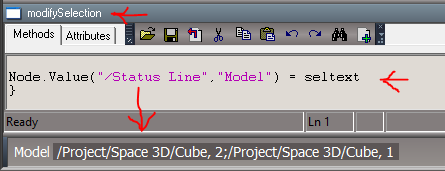
I would love it even better if it would list the Node.ShortName of the selection in the Status Line.
Something Workspace's [multi-sel] in the Info panel is lacking.
Can not figure out how to get just the name(S) without the path.
Got the path stripped, but not all the objects in the selection. Only the current selected.
I would love it even better if it would list the Node.ShortName of the selection in the Status Line.
Something Workspace's [multi-sel] in the Info panel is lacking.
Can not figure out how to get just the name(S) without the path.
- Capture.PNG (9.03 KiB) Viewed 4608 times
Code: Select all
var PathIn = seltext;
path = PathIn.split("/");
concat = (path.length) -1;
Node.Value("/Status Line","Model") = path[concat];-
clintonman
- Captain
- Posts: 5659
- Joined: 21 May 2009, 21:08
- Type the number ten into the box: 0
- Location: California
Re: CTRL button simulator
This works. Code changes to the end of modifySelection.
Edit: BTW Adding CTRL selection button to the LE title bar was a nice addition to the Unofficial Updates.
Code: Select all
	numsel = theOldSelection.GetSize();
	seltext = "";
	statustext = "";
	if(numsel > 0)
		for(j=0;j<numsel;j++)
		{
			seltext = seltext + theOldSelection.GetAt(j);
			statustext = statustext + Node.ShortName(theOldSelection.GetAt(j));
			if(j<numsel-1) seltext = seltext + ";";
			if(j<numsel-1) statustext = statustext + ";";
		}

	//Node.Select(seltext);//only works for single item selection
	//System.Trace(seltext);
	//Space.Select(seltext);
	params.ConValue('selectionString') = seltext;

	Node.Value(System.ThisOwner() + "/selNode", "theSelection") = theOldSelection;


	Node.Value("/Status Line","Model") = statustext;

}-
trueBlue
- Captain
- Posts: 5548
- Joined: 06 Jul 2009, 22:50
- Type the number ten into the box: 10
Re: CTRL button simulator
Yeah!!! 
Thank YOU!
Thank YOU!
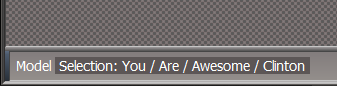
- Capture.PNG (3.17 KiB) Viewed 1775 times
- Attachments
-
- ctrlSelectionGroup.RsObj
- (30.4 KiB) Downloaded 216 times