Just figuring out how to use Messiah.
One problem I ran into was deleting the entire animation. I'll have to see if I can figure out
how to do that. It would take far too long to delete each key from each channel, for each bone/IK Goal. Ugh.
Maybe I can look that up tonight.
Workin on Messiah
-
froo
- Captain
- Posts: 2554
- Joined: 22 May 2009, 12:13
Workin on Messiah
-
froo
- Captain
- Posts: 2554
- Joined: 22 May 2009, 12:13
Re: Workin on Messiah
Here's a youtube video. Just Butch stretchin out, or tryin to do the cracker dance.
http://www.youtube.com/watch?v=goe7I6gG26s"
http://www.youtube.com/watch?v=goe7I6gG26s"
-
Steinie

- Captain
- Posts: 2958
- Joined: 21 May 2009, 17:38
- Type the number ten into the box: 10
Re: Workin on Messiah
Learning Messiah will definitely be my next big goal. So share anything you pickup Jason. I'll be watching and taking notes.
-
froo
- Captain
- Posts: 2554
- Joined: 22 May 2009, 12:13
Re: Workin on Messiah
Thanks Bob will do. 
-
pugman 1
- Captain
- Posts: 1555
- Joined: 21 May 2009, 19:26
- Type the number ten into the box: 0
- Location: Germany
Re: Workin on Messiah
Respect for lerning that app. way to go Froo
-
froo
- Captain
- Posts: 2554
- Joined: 22 May 2009, 12:13
Re: Workin on Messiah
Thanks pugman.
I really need to focus on character animation.
Blender is on the list as well.
I really need to focus on character animation.
Blender is on the list as well.
-
Tiles

- Master Chief Petty Officer
- Posts: 401
- Joined: 27 May 2009, 08:34
Re: Workin on Messiah
Honestly, i would go with Blender, and forget about Messiah. It`s wasted time. Messiah is simply too flawed. It has its reason why it became quiet very quick around Messiah once the dare to share campaign was over.
Free Gamegraphics, Freeware Games http://reinerstilesets.de
-
froo
- Captain
- Posts: 2554
- Joined: 22 May 2009, 12:13
Re: Workin on Messiah
What flaws did you encounter Tiles?
Also, what flaws do you recall, from other users?
I remember you had some trouble with the UV maps.
The primary thing I am wanting right now, is IK that works.
Messiah provides that, at least for now.
Both interfaces (Messiah and Blender) are foreign to me,
but then again, every application is like that for me. So I have
to plow through it to get the job done.
Also, what flaws do you recall, from other users?
I remember you had some trouble with the UV maps.
The primary thing I am wanting right now, is IK that works.
Messiah provides that, at least for now.
Both interfaces (Messiah and Blender) are foreign to me,
but then again, every application is like that for me. So I have
to plow through it to get the job done.
-
Tiles
- Master Chief Petty Officer
- Posts: 401
- Joined: 27 May 2009, 08:34
Re: Workin on Messiah
Lemme say it that way: when you need a big tutorial of how to load a simple texture, then you know that you have a UI problem. This problem is even bigger when the Manual is for version 4, and you have version 5 with some changings here and there, and the company is not willing to update the manual. Messiah UI is ways worse than the Blender UI ever was. It is a new dimension of cluttered and user unfriendly.
But that was not what has stopped me. It`s the fact that nearly no im and export format really works. There is no proper pipeline.
The only format that carries nearly everything into the scene is the lwo format. And even that one misses the normal map (I was even with help not able to reapply it). The only export format that somehow works is FBX. DXF and 3DS crashes Messiah to death. Obj im and export is FUBAR. What arrives is the vertices information, if even. Those guys didn`t even know that Obj is made of two files, the *.obj file, and the *.mtl file. Here a part of the answer from PMG:
And you better forget about multiple UV`s, means more than one texture, at one mesh too. Well, lwo imports it. A second UV will get shot down with Obj at import though. And get shot down at export, no matter with what format. They promised to fix that issue for FBX. And that`s what the patch is meant for. But my FBX arrived still with shot down second UV. The patch was not successful for me.
I`ve contacted them, told them what is going on with Obj and FBX. They asked for an example, which i have sent them then. I also explained them what the *.mtl file is good for in this answer. See answer above. And that was the last thing i ever heard from them. Means, forget about support too.
The bones system itself may be powerful and useful. But what`s it worth when you cannot use the result then?
That for my experiences so far. You can also have a look at other forums, it`s oh so quiet. Lots of people have bought the dare to share license, but everybody tries to forget about Messiah as fast as possible. Even the Setuptab forum became really quiet. And that`s the official Messiah forum. Outside of the Setuptab forum Messiah doesn`t really gets mentioned anymore.
Clearer now why i think that Messiah is a dead end?
Blender UI is better in 2.5. Even i have made it to Blender meanwhile. IK is a special chapter though in Blender, very different from the trueSpace IK. There are no handlers or locks. You make the bones to handlers, which is sometimes very confusing. Even i still battle with it. So don`t expect quick results in case you go that route. But there is always a workaround or help from a more experienced user. And different from Messiah, i can export the result in a proper way
But that was not what has stopped me. It`s the fact that nearly no im and export format really works. There is no proper pipeline.
The only format that carries nearly everything into the scene is the lwo format. And even that one misses the normal map (I was even with help not able to reapply it). The only export format that somehow works is FBX. DXF and 3DS crashes Messiah to death. Obj im and export is FUBAR. What arrives is the vertices information, if even. Those guys didn`t even know that Obj is made of two files, the *.obj file, and the *.mtl file. Here a part of the answer from PMG:
Scary when a user has to explain the programmer of a professional company the file specifications. Even scarier when you do so , and the programmer still doesn`t believe it. One look in the internet would`ve been enough ...As for the .obj export. Since the time the obj export was made there never was a .mtl that was part of the object geometry export. It imported and exported the object data only, and we've never even heard of a the .mtl file or have ever seen anyone mention it in 11 years. That would lead me to believe that it's either something newly added to the object, or not really part of the obi data itself, and that might be why it's doesn't exist.
And you better forget about multiple UV`s, means more than one texture, at one mesh too. Well, lwo imports it. A second UV will get shot down with Obj at import though. And get shot down at export, no matter with what format. They promised to fix that issue for FBX. And that`s what the patch is meant for. But my FBX arrived still with shot down second UV. The patch was not successful for me.
I`ve contacted them, told them what is going on with Obj and FBX. They asked for an example, which i have sent them then. I also explained them what the *.mtl file is good for in this answer. See answer above. And that was the last thing i ever heard from them. Means, forget about support too.
The bones system itself may be powerful and useful. But what`s it worth when you cannot use the result then?
That for my experiences so far. You can also have a look at other forums, it`s oh so quiet. Lots of people have bought the dare to share license, but everybody tries to forget about Messiah as fast as possible. Even the Setuptab forum became really quiet. And that`s the official Messiah forum. Outside of the Setuptab forum Messiah doesn`t really gets mentioned anymore.
Clearer now why i think that Messiah is a dead end?
Blender UI is better in 2.5. Even i have made it to Blender meanwhile. IK is a special chapter though in Blender, very different from the trueSpace IK. There are no handlers or locks. You make the bones to handlers, which is sometimes very confusing. Even i still battle with it. So don`t expect quick results in case you go that route. But there is always a workaround or help from a more experienced user. And different from Messiah, i can export the result in a proper way
Free Gamegraphics, Freeware Games http://reinerstilesets.de
-
RAYMAN

- Captain
- Posts: 2547
- Joined: 21 May 2009, 18:56
Re: Workin on Messiah
The reason I never opted for messiah was that at the moment of the deal Vue didnt support it..
Vue now supports fbx import but I still always had very good results with Poser and DAZ studio up to the fact
that I never needed anything else....and I already owned copies of Poser and Daz..
I used the trial a few time and disliked the workflow.. which is 3000 % more intuitive in Poser and Daz....
The only problem I ever found was setting up character in Daz and Poser but they are slowly adressing it.....
Peter
Vue now supports fbx import but I still always had very good results with Poser and DAZ studio up to the fact
that I never needed anything else....and I already owned copies of Poser and Daz..
I used the trial a few time and disliked the workflow.. which is 3000 % more intuitive in Poser and Daz....
The only problem I ever found was setting up character in Daz and Poser but they are slowly adressing it.....
Peter
-
3dfrog

- Senior Chief Petty Officer
- Posts: 175
- Joined: 21 May 2009, 21:09
Re: Workin on Messiah
Tiles does make some good points here, especially with the obj import and the poor exporters. I have done a lot of work in messiah, and find it a very good animation application. I still hate the obj import and export but have learned to work with it. Knowing it won't bring in the obj native colors on an object I don't spend a lot of time setting them in my modeling app, I just set up my material names then do the materials in messiah.
I have done two full length episodes in messiah for a kids program, it can be done, and others way better at animating and modeling than me have done some amazing work in messiah. It can be done, but yes there are these obstacles to overcome.
I think if froo wrote a proper obj package for messiah he'd be the hero of the community (hint hint) Anyways. I would suggest keep experimenting with it. You'll find if it is for you or not.
That being said, I am going to animation school in January and have been learning a little Maya as that is the software they use for it. Maya is kind of intimidating, so much going on in it. But I'll keep at it.
I have done two full length episodes in messiah for a kids program, it can be done, and others way better at animating and modeling than me have done some amazing work in messiah. It can be done, but yes there are these obstacles to overcome.
I think if froo wrote a proper obj package for messiah he'd be the hero of the community
(hint hint) Anyways. I would suggest keep experimenting with it. You'll find if it is for you or not.That being said, I am going to animation school in January and have been learning a little Maya as that is the software they use for it. Maya is kind of intimidating, so much going on in it. But I'll keep at it.
-
jamesmc
- Captain
- Posts: 1776
- Joined: 08 Jul 2009, 15:35
Re: Workin on Messiah
The latest kick around the community was to make "MDD" importers and exporters for the various 3D softwares to and from Messiah.
I know one recent one was written in Carrara 8 Pro and of course, there is one for Lightwave3D (former plug-in writers for lightwave3d are Messiah programmers now.)
I know one recent one was written in Carrara 8 Pro and of course, there is one for Lightwave3D (former plug-in writers for lightwave3d are Messiah programmers now.)
Walk by faith, not by sight.
-
Finis

- Captain
- Posts: 5410
- Joined: 21 May 2009, 18:26
- Type the number ten into the box: 0
- Location: America!
Re: Workin on Messiah
A friendly user interface isn't everything but it certainly is important. Sometimes TS reminds me of the Motif interface system for Xwindows. You could make a UI that wasn't connected to a program. TS has a great user interface but much of TS doesn't work or doesn't work well. It has flaws galore yet many of us still make great pictures using only TS.
Messiah certainly doesn't have a friendly user interface. I expect a powerful program to be complicated or even difficult to learn to use properly. It takes study and a willingness to work to achieve a goal. That is sadly lacking in people now days but there are plenty of people who have put in the work to learn Blender's notoriously horrible interface ... and been rewarded with its power.
Tiles makes a good point about the import/export. I'd see Messiah as a destination program so I'd do the materials, animation, and rendering there. It is very important though to have it fully participate in a pipeline with good import/export ... especially since it is basically an animation specialty program. Poor support and documentation for a complicated program = bad.
I've been enthusiastic about learning Messiah although I have little free time. I'm thinking now that Blender might be a better choice for my investment of learning time and effort. Again, the UI stinks (Blender's) but I'm willing to work to learn Blender (or Messiah or whatever) to get a lot of ability.
Reasons for Blender:
o Hopefully character animation. That's what I want now. I think Blender can do this.
o Full featured complete 3D package like TS. It is time for me to migrate away from TS so I need a modeler, renderer, materials system, ...
o Free upgrades. I got Messiah on the cheap deal but future upgrades won't be cheap.
o Better support and documentaion.
o Many renderers can be used from free up to the big boys.
o Lots of add-ons, pulg-ins, etc.
o Pipeline friendly.
Messiah certainly doesn't have a friendly user interface. I expect a powerful program to be complicated or even difficult to learn to use properly. It takes study and a willingness to work to achieve a goal. That is sadly lacking in people now days but there are plenty of people who have put in the work to learn Blender's notoriously horrible interface ... and been rewarded with its power.
Tiles makes a good point about the import/export. I'd see Messiah as a destination program so I'd do the materials, animation, and rendering there. It is very important though to have it fully participate in a pipeline with good import/export ... especially since it is basically an animation specialty program. Poor support and documentation for a complicated program = bad.
I've been enthusiastic about learning Messiah although I have little free time. I'm thinking now that Blender might be a better choice for my investment of learning time and effort. Again, the UI stinks (Blender's) but I'm willing to work to learn Blender (or Messiah or whatever) to get a lot of ability.
Reasons for Blender:
o Hopefully character animation. That's what I want now. I think Blender can do this.
o Full featured complete 3D package like TS. It is time for me to migrate away from TS so I need a modeler, renderer, materials system, ...
o Free upgrades. I got Messiah on the cheap deal but future upgrades won't be cheap.
o Better support and documentaion.
o Many renderers can be used from free up to the big boys.
o Lots of add-ons, pulg-ins, etc.
o Pipeline friendly.
I prefer dangerous freedom over peaceful servitude. -- Thomas Jefferson/Jean Jacques Rousseau
-
froo
- Captain
- Posts: 2554
- Joined: 22 May 2009, 12:13
Re: Workin on Messiah
Excellent input everyone.
Truespace also has a lot of flaws and its critics, all who have valid opinions and insights.
It looks like the SetupTab forums are the same way. Yeah that's pretty insane, that they
did not know about the mtl file. Their reply indicated they were not aware of a MTL file
being related to the Geometry of the object. They mentioned nothing about textures.
I wonder now... with obj import into messiah, is it a problem with messiah, or the importer
they developed? If messiah is inherently flawed in this regard then forget it. Otherwise,
maybe at some point I could consider porting the obj package to messiah.
As far as import / export, my main concern is getting ik animation in and out of the application.
I really don't care about textures until I get to the rendering application. That my end up
being messiah. For me, I'd just slap a color on that is representative of my intentions until
I am ready to apply materials. I guess that's a form of pre-vis.
Yes Messiah is complicated; I went through some of the tutorials for rigging and it's complex.
But then again I read about 3d films where they discuss the really complicated rigging.
As for textures, I saw a link yesterday for materials. The messiah docs don't cover it much;
looks like someone else did an awesome job, so the devs figured, why bother spending time
reinventing the wheel.
I want to work with blender as well. Especially the special effects. But first things first:
ik rigging in Messiah. Then in Blender.
Froo
Truespace also has a lot of flaws and its critics, all who have valid opinions and insights.
It looks like the SetupTab forums are the same way. Yeah that's pretty insane, that they
did not know about the mtl file. Their reply indicated they were not aware of a MTL file
being related to the Geometry of the object. They mentioned nothing about textures.
I wonder now... with obj import into messiah, is it a problem with messiah, or the importer
they developed? If messiah is inherently flawed in this regard then forget it. Otherwise,
maybe at some point I could consider porting the obj package to messiah.
As far as import / export, my main concern is getting ik animation in and out of the application.
I really don't care about textures until I get to the rendering application. That my end up
being messiah. For me, I'd just slap a color on that is representative of my intentions until
I am ready to apply materials. I guess that's a form of pre-vis.
Yes Messiah is complicated; I went through some of the tutorials for rigging and it's complex.
But then again I read about 3d films where they discuss the really complicated rigging.
As for textures, I saw a link yesterday for materials. The messiah docs don't cover it much;
looks like someone else did an awesome job, so the devs figured, why bother spending time
reinventing the wheel.
I want to work with blender as well. Especially the special effects. But first things first:
ik rigging in Messiah. Then in Blender.
Froo
-
Tiles
- Master Chief Petty Officer
- Posts: 401
- Joined: 27 May 2009, 08:34
Re: Workin on Messiah
Then Blender is a bad choice. When it`s about polygon modeling, then trueSpace is still miles ahead compared to Blender. Blender still lacks of N-Gon support. Which means you will be trapped sooner or later. That`s at least what happened to me. I would`ve had to remodel the mesh. You cannot simply delete a edge or add a edge where you want. Blender immediately triangulates the by that created N-Gon away. Happy Edgeloop reconnecting ...t is time for me to migrate away from TS so I need a modeler,
Blender has stuff like sculpting though. That`s why i use both
Free Gamegraphics, Freeware Games http://reinerstilesets.de
-
DarkScythe
- Senior Chief Petty Officer
- Posts: 243
- Joined: 23 Sep 2009, 08:57
Re: Workin on Messiah
if you want to work with blender everything you do is plan ahead so you don't get stuck from modeling and rigging and always hit the space bar if your looking for something.
as for Messiah I think they are waiting for the "MESSIAH" to come and save them.
as for Messiah I think they are waiting for the "MESSIAH" to come and save them.
-
Finis
- Captain
- Posts: 5410
- Joined: 21 May 2009, 18:26
- Type the number ten into the box: 0
- Location: America!
Re: Workin on Messiah
Yeah. I put a Reasons for Blender list above. The Ngon thing is a Reason against Blender.Tiles wrote:Blender still lacks of N-Gon support.
I still intend to study and go through some tutorials on Messiah but it is not a modeler so I still need one eventually. I'd prefer to use just one or very few programs for the bulk of my 3D work and that gives the TS/Blender/all-in-ones points for being multifunction non-specialty programs.
I prefer dangerous freedom over peaceful servitude. -- Thomas Jefferson/Jean Jacques Rousseau
-
v3rd3
- Lieutenant Commander
- Posts: 1191
- Joined: 21 May 2009, 20:04
Re: Workin on Messiah
I tried to explain the difference between TS and other modellers and found the easiest explanation was that TS was built to forgive..... does that make any sense?
-
RAYMAN
- Captain
- Posts: 2547
- Joined: 21 May 2009, 18:56
Re: Workin on Messiah
That powerfull programs have to be complicated is purely WRONG !
I decided against complicated programs after going through a few of those...
I decided to go for a few programs rather then one beacuse that was the easiest way to go......
Although i have quite a few big packages i always come back to the simplest......
Silo is a basic modeler that doesnt cost an arm and a leg and does 99 % of what I need for sds modeling plain simple and miles ahead of any Blender or anything else...
although Modo is very cool for poly modeling...
Moi 3d is easy to use and probably the nearest to what Truespace ever wanted to be about 10 times more productive for cad models that dont need to be rigged..
The myth that you dont get nice meshes from nurbs modelers is exactly that ! a myth !
and Sketchup is a must have for architectural models and block modeling......No other program has the same level of snapping capabilities and uses components and speeds up modeling as much...... !
Moi and Sketchup work together seamlessly because moi exports sketchup files and can be directly imported as a component......
I´ve gone through the all in one package fiasco a dozen times and lost interest in 3D for a while as such before I found my workflow......
Having my modeling covered I knew what I didnt like and that was UV mapping...
Texturing inside Sketchup is very easy.. you just select your texture and point it to the surface and its done but for sds models UV mapping is a pain in the ***
That led me to 3d Coat....probably the easiest and most powertfull way of putting something like a texture onto a surface...
With all that covered I needed something to get everything onto paper.....
That led me to Vue and Thea......
Why Vue and Thea... because Vue can build the biggest setups with the least hardware and maximum control over these instances a reason it was used for so many big cinema productions... and simply because i dont have the $$$$$$ to run the same specs on Renderman (I´m not Pixar)
The backside of the coin is that some beauty renders need something even better then what vue can do so that I came to Thea over the years.. its a fraction of the cost of Maxwell and the render quality is compareable. Positive sideffect is that Thea has very good exporters from both Sketchup and Blender even for the free version of Sketchup and every component of Sketchup like a window is handled like an instace... that way you can have thousands of components like a window with
low hardware footprint....
Thepreview and render of thea is in realtime like Oktane
That leads me to animation.....Since vue imports animations with Collada and Poser files and fbx and MDD you can throw at it anything even physical animations from Truespace and it works....
Poser and Daz studio being the easiest and very powerfull... even a 50$ Poser 5 works well with it.. and is VERY easy to use..
My pipeline is a lot easier than anything I´ve gone through over the years in one package.. and many of you have a few of those things already...
And it works better then a single package....WHY because every one of those applications is the easiest and most powerfull in its own field
The rest is a little Zbrush and Sculptris...(DID I MENTION I HATE ZBRUSHES UI AND LIKE THAT OF SCULPTRIS MORE...)
Peter
I decided against complicated programs after going through a few of those...
I decided to go for a few programs rather then one beacuse that was the easiest way to go......
Although i have quite a few big packages i always come back to the simplest......
Silo is a basic modeler that doesnt cost an arm and a leg and does 99 % of what I need for sds modeling plain simple and miles ahead of any Blender or anything else...
although Modo is very cool for poly modeling...
Moi 3d is easy to use and probably the nearest to what Truespace ever wanted to be about 10 times more productive for cad models that dont need to be rigged..
The myth that you dont get nice meshes from nurbs modelers is exactly that ! a myth !
and Sketchup is a must have for architectural models and block modeling......No other program has the same level of snapping capabilities and uses components and speeds up modeling as much...... !
Moi and Sketchup work together seamlessly because moi exports sketchup files and can be directly imported as a component......
I´ve gone through the all in one package fiasco a dozen times and lost interest in 3D for a while as such before I found my workflow......
Having my modeling covered I knew what I didnt like and that was UV mapping...
Texturing inside Sketchup is very easy.. you just select your texture and point it to the surface and its done but for sds models UV mapping is a pain in the ***
That led me to 3d Coat....probably the easiest and most powertfull way of putting something like a texture onto a surface...
With all that covered I needed something to get everything onto paper.....
That led me to Vue and Thea......
Why Vue and Thea... because Vue can build the biggest setups with the least hardware and maximum control over these instances a reason it was used for so many big cinema productions... and simply because i dont have the $$$$$$ to run the same specs on Renderman (I´m not Pixar)
The backside of the coin is that some beauty renders need something even better then what vue can do so that I came to Thea over the years.. its a fraction of the cost of Maxwell and the render quality is compareable. Positive sideffect is that Thea has very good exporters from both Sketchup and Blender even for the free version of Sketchup and every component of Sketchup like a window is handled like an instace... that way you can have thousands of components like a window with
low hardware footprint....
Thepreview and render of thea is in realtime like Oktane
That leads me to animation.....Since vue imports animations with Collada and Poser files and fbx and MDD you can throw at it anything even physical animations from Truespace and it works....
Poser and Daz studio being the easiest and very powerfull... even a 50$ Poser 5 works well with it.. and is VERY easy to use..
My pipeline is a lot easier than anything I´ve gone through over the years in one package.. and many of you have a few of those things already...
And it works better then a single package....WHY because every one of those applications is the easiest and most powerfull in its own field
The rest is a little Zbrush and Sculptris...(DID I MENTION I HATE ZBRUSHES UI AND LIKE THAT OF SCULPTRIS MORE...)
Peter
Last edited by RAYMAN on 03 Sep 2011, 10:22, edited 2 times in total.
-
Tiles
- Master Chief Petty Officer
- Posts: 401
- Joined: 27 May 2009, 08:34
Re: Workin on Messiah
Nowadays i avoid too complicated tools. Life`s too short for battling all the time. And science is progressed enough that a software developer should able to provide a user friendly UI. Even Blender has a better one now. Even when it`s still miles away from being perfect.
I wouldn`t trash a tool completely as long as there is a benefit from it. I even still use Roadkill for cutting the unwrap seams, because it is the fastest method i know of. As told, i use both, trueSpace and Blender. Together. trueSpace is the better polygon modeler, and Blender gives me the other missing state of the art tools like sculpting.
I wouldn`t trash a tool completely as long as there is a benefit from it. I even still use Roadkill for cutting the unwrap seams, because it is the fastest method i know of. As told, i use both, trueSpace and Blender. Together. trueSpace is the better polygon modeler, and Blender gives me the other missing state of the art tools like sculpting.
Free Gamegraphics, Freeware Games http://reinerstilesets.de
-
richlevy

- Senior Chief Petty Officer
- Posts: 162
- Joined: 17 Aug 2009, 20:08
Re: Workin on Messiah
Wow, this is an interesting conversation...
I have gone full circle, I started in 3D with just a few tools, and after many years of using almost everything I could find... I am back to using just a couple of tools. Modo, 3DCoat and Messiah. THey have a pretty good flow between them not perfect, nothing really is with 3D but good enough for me. I can get the other 2D tools I use to work with the inputs and outputs from those programs well enough (Premiere and After Effects and Photoshop)...
Eventually I will get my head around Unreal engine again and start moving things in that direction...
Messiah is no better or worse than any other program, not perfect but not bad, there really is a lot of power in this program, and if you purchased it at the discount, you got a bargain...
Rich
I have gone full circle, I started in 3D with just a few tools, and after many years of using almost everything I could find... I am back to using just a couple of tools. Modo, 3DCoat and Messiah. THey have a pretty good flow between them not perfect, nothing really is with 3D but good enough for me. I can get the other 2D tools I use to work with the inputs and outputs from those programs well enough (Premiere and After Effects and Photoshop)...
Eventually I will get my head around Unreal engine again and start moving things in that direction...
Messiah is no better or worse than any other program, not perfect but not bad, there really is a lot of power in this program, and if you purchased it at the discount, you got a bargain...
Rich
My Flickr site, here you can see some of the photography I do:
http://www.flickr.com/photos/rich-l/" onclick="window.open(this.href);return false;
http://www.flickr.com/photos/rich-l/" onclick="window.open(this.href);return false;
-
Finis
- Captain
- Posts: 5410
- Joined: 21 May 2009, 18:26
- Type the number ten into the box: 0
- Location: America!
Re: Workin on Messiah
Good to hear from you Rich. Where can we see some of your 3D work?
I prefer dangerous freedom over peaceful servitude. -- Thomas Jefferson/Jean Jacques Rousseau
-
richlevy
- Senior Chief Petty Officer
- Posts: 162
- Joined: 17 Aug 2009, 20:08
Re: Workin on Messiah
Hey Finis, most of the work that I have made public can be found here or on the Caligari forums. Now days I mostly just doodle. Play around with some modeling, a little texturing and some animation... nothing too fancy.
I did start a doodle thread about a month ago, slowly when I find some time I play around with the character I posted there. It is a bit further along than he is in that thread, but not too far. As life allows me some free time, I do a bit more work on him.
Eventually, I will get him done it may take some time though hehehe
Rich
I did start a doodle thread about a month ago, slowly when I find some time I play around with the character I posted there. It is a bit further along than he is in that thread, but not too far. As life allows me some free time, I do a bit more work on him.
Eventually, I will get him done
it may take some time though heheheRich
My Flickr site, here you can see some of the photography I do:
http://www.flickr.com/photos/rich-l/" onclick="window.open(this.href);return false;
http://www.flickr.com/photos/rich-l/" onclick="window.open(this.href);return false;
-
Steinie
- Captain
- Posts: 2958
- Joined: 21 May 2009, 17:38
- Type the number ten into the box: 10
Re: Workin on Messiah
OK after three days studying I finally Auto Rigged a Character in Messiah and documented each step.
How do I get my textures back onto the model? It seems to want a material file (mrm or mma).
Update:
I think the answer about textures is found under Render->Materials->Texture->Use U/V Map coordinates. I'll test this tonight.
How do I get my textures back onto the model? It seems to want a material file (mrm or mma).
Update:
I think the answer about textures is found under Render->Materials->Texture->Use U/V Map coordinates. I'll test this tonight.
-
pugman 1
- Captain
- Posts: 1555
- Joined: 21 May 2009, 19:26
- Type the number ten into the box: 0
- Location: Germany
Re: Workin on Messiah
Cool, i would be interested to see the docs when your finished with them
Ralph
Ralph
-
Steinie
- Captain
- Posts: 2958
- Joined: 21 May 2009, 17:38
- Type the number ten into the box: 10
Re: Workin on Messiah
Yes Pugman my plan is to document Messiah steps so that it is simple to use. I'll be posting my steps here once I'm done.
It will be a "Beginners Guide" where you take your Character step by step to Rig, Texture, Animate it.
All the other zillion buttons and options will be left for the Pros to discuss. The flow of the application is not smooth but using my guide it becomes real easy.
There are simple basic things Messiah does different that you scratch your head at like scroll bars on the left? Controlling the view with little buttons on the top right where trueSpace controls would shine!
What the heck...
When it is done I'll put the Guide under the "Animation" topic.
It will be a "Beginners Guide" where you take your Character step by step to Rig, Texture, Animate it.
All the other zillion buttons and options will be left for the Pros to discuss. The flow of the application is not smooth but using my guide it becomes real easy.
There are simple basic things Messiah does different that you scratch your head at like scroll bars on the left? Controlling the view with little buttons on the top right where trueSpace controls would shine!
What the heck...
When it is done I'll put the Guide under the "Animation" topic.
-
froo
- Captain
- Posts: 2554
- Joined: 22 May 2009, 12:13
Re: Workin on Messiah
Excellent. That would be Very cool Steinie.
I have manually rigged Crazy Bob bob have some issues with
rotations. When I move the arms forward and backward, the wrist
tends to swing inward, so the arm is in front of the abdomen.
I need to adjust the range limits I think. Will your documentation
cover that? I seem to have had the same problem in trueSpace.
Thanks!
Froo
I have manually rigged Crazy Bob bob have some issues with
rotations. When I move the arms forward and backward, the wrist
tends to swing inward, so the arm is in front of the abdomen.
I need to adjust the range limits I think. Will your documentation
cover that? I seem to have had the same problem in trueSpace.
Thanks!
Froo
-
Steinie
- Captain
- Posts: 2958
- Joined: 21 May 2009, 17:38
- Type the number ten into the box: 10
Re: Workin on Messiah
Yes I'll be covering range limits once I get comfortable with them.
I finally textured the model and believe me it is not intuitive adding a "texture map" without help. Once you figure it out it is easy. I'll be looking at multiple UV mapping which Tiles had problems...don't expect miracles from me.
Handling the camera and general moving around the scene is horrible. TrueSpace wins again.
If Messiah had a trueSpace UI it would be an awesome program. Right now it is a very powerful program.
Once I get a Easy First Step Tutorial put together I hope others can add to it also. I know there are a few of you who are way more knowledgeable then me with the program. Your tips can help us all.
Messiah really is NOT an intuitive program as they advertise BUT
Messiah can do almost anything if you dedicate your life to it like a Monk.
I finally textured the model and believe me it is not intuitive adding a "texture map" without help. Once you figure it out it is easy. I'll be looking at multiple UV mapping which Tiles had problems...don't expect miracles from me.
Handling the camera and general moving around the scene is horrible. TrueSpace wins again.
If Messiah had a trueSpace UI it would be an awesome program. Right now it is a very powerful program.
Once I get a Easy First Step Tutorial put together I hope others can add to it also. I know there are a few of you who are way more knowledgeable then me with the program. Your tips can help us all.
Messiah really is NOT an intuitive program as they advertise BUT
Messiah can do almost anything if you dedicate your life to it like a Monk.
-
froo
- Captain
- Posts: 2554
- Joined: 22 May 2009, 12:13
Re: Workin on Messiah
Here's one that 3dfrog taught me, Steinie:
You can manually adjust bones at keyframes as well.
So, let's say you have a biped character rigged, and you want to make a walk cycle.
You move the arm by using the IK goal, but it doesn't look right. You can perform manual
tweaks/adjustments. In this case, select the Upper Arm bone, and rotate it so it looks the way you want.
You can manually adjust bones at keyframes as well.
So, let's say you have a biped character rigged, and you want to make a walk cycle.
You move the arm by using the IK goal, but it doesn't look right. You can perform manual
tweaks/adjustments. In this case, select the Upper Arm bone, and rotate it so it looks the way you want.
-
richlevy
- Senior Chief Petty Officer
- Posts: 162
- Joined: 17 Aug 2009, 20:08
Re: Workin on Messiah
keep in mind that Messiah started as a Lightwave plugin, so the basics of the program are from a slightly different perspective than a TS user may understand easily... Thatcamera movement is a pain, there is a plugin created to make this a touch more simple, I'll look for it later when I get back. As for Navigation, the best bet is to go into the Customize> KeyCommand Manager> Navigation than set up for the best fit for yourself. There is also a MAya preset in there somewhere. that is usually the best to start with for most people.
Rich
Rich
My Flickr site, here you can see some of the photography I do:
http://www.flickr.com/photos/rich-l/" onclick="window.open(this.href);return false;
http://www.flickr.com/photos/rich-l/" onclick="window.open(this.href);return false;
-
froo
- Captain
- Posts: 2554
- Joined: 22 May 2009, 12:13
Re: Workin on Messiah
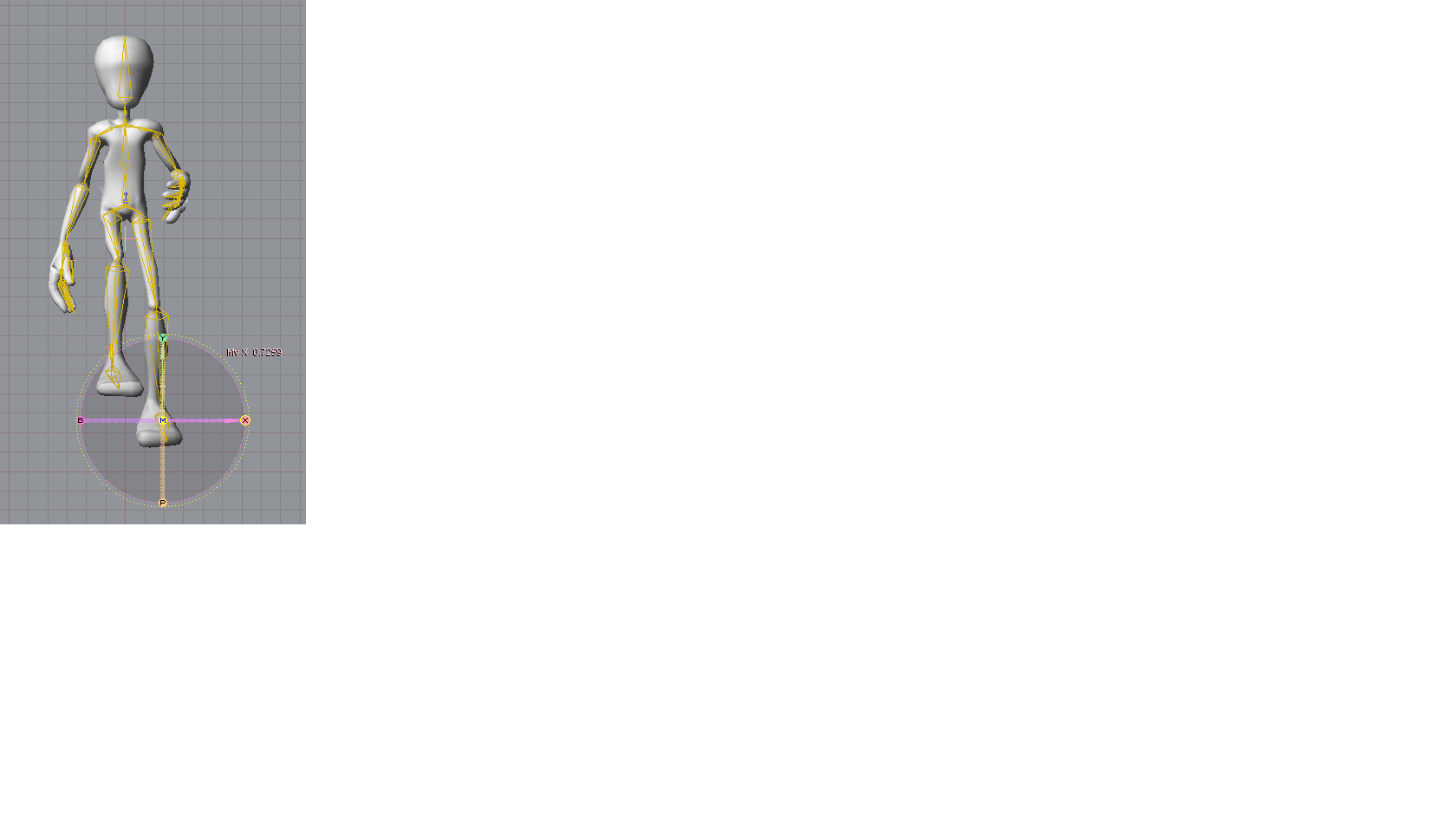
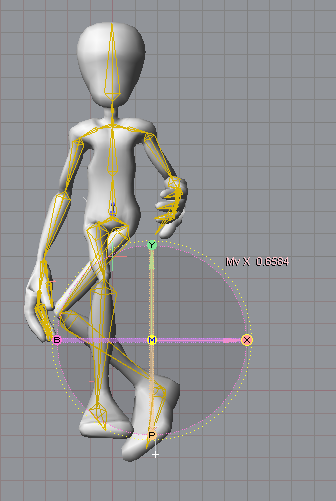
Ok I have a problem with bone rotation.
Here's a snapshot. Any tips?
Also here's a brief description at setuptab.com of the problem:
http://setuptab.com/index.php?topic=4813.0"
Here's a snapshot. Any tips?
Also here's a brief description at setuptab.com of the problem:
http://setuptab.com/index.php?topic=4813.0"
- Attachments
-
-
-
pugman 1
- Captain
- Posts: 1555
- Joined: 21 May 2009, 19:26
- Type the number ten into the box: 0
- Location: Germany
Re: Workin on Messiah
Hi Froo it looks like you have to set how far things can bend.
I have a prob in blender his feet stick to the floor everything else moves ok.
I have a prob in blender his feet stick to the floor everything else moves ok.
- Attachments
-

-
DarkScythe
- Senior Chief Petty Officer
- Posts: 243
- Joined: 23 Sep 2009, 08:57
Re: Workin on Messiah
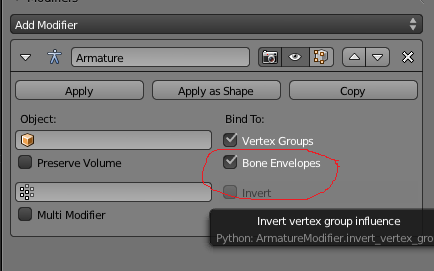
.... go to object modifier that's the "armature modifier" and uncheck bone envelopes.. sometimes you have to manually adjust the bone weights you can do this via weight paint mode...Hi Froo it looks like you have to set how far things can bend.
I have a prob in blender his feet stick to the floor everything else moves ok.
- Attachments
-
-
pugman 1
- Captain
- Posts: 1555
- Joined: 21 May 2009, 19:26
- Type the number ten into the box: 0
- Location: Germany
Re: Workin on Messiah
Thanks DarkScythe sorry but that did not do the job.
I think the posts on blender here should be moved to a different thread
Sorry for posting this here
I think the posts on blender here should be moved to a different thread
Sorry for posting this here
-
DarkScythe
- Senior Chief Petty Officer
- Posts: 243
- Joined: 23 Sep 2009, 08:57
Re: Workin on Messiah
here is the link vi ... 553#p29553Thanks DarkScythe sorry but that did not do the job.
I think the posts on blender here should be moved to a different thread
Sorry for posting this here
and if you know some other way share it with us blender is a little bit tricky.
-
clintonman

- Captain
- Posts: 5659
- Joined: 21 May 2009, 21:08
- Type the number ten into the box: 0
- Location: California
Re: Workin on Messiah
Maybe the problem is that the IK doesn't stop at the hip. The hip should be separate from the IK chain of the leg.
-
froo
- Captain
- Posts: 2554
- Joined: 22 May 2009, 12:13
Re: Workin on Messiah
Thanks Clinton.
I ended up deleting the pelvis/hip bones: left and right.
Even with the pelvis bones in place, I set the thigh bones as the anchor,
and I had problems with the leg movement. But once I deleted
the pelvis/hip bones from the skeleton, I get proper movement.
That's not to say this is the best solution, as we may need those bones.
but, I can have them separated, as needed.
I ended up deleting the pelvis/hip bones: left and right.
Even with the pelvis bones in place, I set the thigh bones as the anchor,
and I had problems with the leg movement. But once I deleted
the pelvis/hip bones from the skeleton, I get proper movement.
That's not to say this is the best solution, as we may need those bones.
but, I can have them separated, as needed.
-
froo
- Captain
- Posts: 2554
- Joined: 22 May 2009, 12:13
Re: Workin on Messiah
Here's Bob Running in Super Slo Mo... circa Six Million Dollar Man style.
This was intended as a walk cycle but it turned into a Run cycle.
I am glad I got this working. More to come, that's for sure!
Froo
http://www.youtube.com/watch?v=Y2LhkbYjwsA"
This was intended as a walk cycle but it turned into a Run cycle.
I am glad I got this working. More to come, that's for sure!
Froo
http://www.youtube.com/watch?v=Y2LhkbYjwsA"
-
Steinie
- Captain
- Posts: 2958
- Joined: 21 May 2009, 17:38
- Type the number ten into the box: 10
Re: Workin on Messiah
Froo, fill us in more about the walk cycle when you get the chance.
Nice going!
p.s.
back in town.
Nice going!
p.s.
back in town.
-
froo
- Captain
- Posts: 2554
- Joined: 22 May 2009, 12:13
Re: Workin on Messiah
Here is the Messiah project file. Load it in Messiah; you should see Bob with his rig.
And, here's a link to the site I used as a reference.
http://www.idleworm.com/how/anm/02w/walk1.shtml"
And, here's a link to the site I used as a reference.
http://www.idleworm.com/how/anm/02w/walk1.shtml"
- Attachments
-
- bob2.zip
- (142.87 KiB) Downloaded 249 times
-
pugman 1
- Captain
- Posts: 1555
- Joined: 21 May 2009, 19:26
- Type the number ten into the box: 0
- Location: Germany
Re: Workin on Messiah
Nice one froo but i think blender is allot easier and quiker for rigging.
-
froo
- Captain
- Posts: 2554
- Joined: 22 May 2009, 12:13
Re: Workin on Messiah
Thanks Ralph.
I will be using blender as well. I think Messiah and Blender both have strong and weak
points, just like all other software. It's a question of, when to use which software. For example,
how well does Blender support more complex rigs, and how does the ease of use change
as the rig complexity increases? Same goes for Messiah.
It's good to hear someone say, that Blender is actually 'easier' for once. Usually there's a lot
of negativity about it.
I will be using blender as well. I think Messiah and Blender both have strong and weak
points, just like all other software. It's a question of, when to use which software. For example,
how well does Blender support more complex rigs, and how does the ease of use change
as the rig complexity increases? Same goes for Messiah.
It's good to hear someone say, that Blender is actually 'easier' for once. Usually there's a lot
of negativity about it.
-
froo
- Captain
- Posts: 2554
- Joined: 22 May 2009, 12:13
Re: Workin on Messiah
Hope you can see this.
I uploaded a walk cycle of Crazy Bob on youtube. I added a little 'bob' to his walk.
No pun intended.
Comments and crits are welcome.
http://www.youtube.com/watch?v=q7-wcSwdb-g"
I uploaded a walk cycle of Crazy Bob on youtube. I added a little 'bob' to his walk.
No pun intended.
Comments and crits are welcome.
http://www.youtube.com/watch?v=q7-wcSwdb-g"
-
Finis
- Captain
- Posts: 5410
- Joined: 21 May 2009, 18:26
- Type the number ten into the box: 0
- Location: America!
Re: Workin on Messiah
Butterpaw is a subscriber to your channel! I miss Butterpaw.
I prefer dangerous freedom over peaceful servitude. -- Thomas Jefferson/Jean Jacques Rousseau
-
froo
- Captain
- Posts: 2554
- Joined: 22 May 2009, 12:13
Re: Workin on Messiah
I miss her too. My wife and I met with her once, when we were living in Virginia Beach.
She lives in North Carolina. It was really cool to meet with her in person.
I need to chat with her on Skype; need to get that setup.
She lives in North Carolina. It was really cool to meet with her in person.
I need to chat with her on Skype; need to get that setup.
-
froo
- Captain
- Posts: 2554
- Joined: 22 May 2009, 12:13
Re: Workin on Messiah
I fixed the foot-sinking-into-the-ground problem.
The original goal was to use an expression, though I don't need to do that.
At least I learned how to create one.
I ended up rotating the foot bone at an appropriate keyframe instead.
So now Bob's feet are flat on the ground.
I guess I have to wait for it to upload. Takin awhile.
The original goal was to use an expression, though I don't need to do that.
At least I learned how to create one.
I ended up rotating the foot bone at an appropriate keyframe instead.
So now Bob's feet are flat on the ground.
I guess I have to wait for it to upload. Takin awhile.
-
froo
- Captain
- Posts: 2554
- Joined: 22 May 2009, 12:13
Re: Workin on Messiah
Here it is.
http://www.youtube.com/watch?v=TqXydsGqh_8"
Next step (heh no pun intended again; damn I am such a comedian!)
is to have Bob walkin up some stairs. That'll be cool.
http://www.youtube.com/watch?v=TqXydsGqh_8"
Next step (heh no pun intended again; damn I am such a comedian!)
is to have Bob walkin up some stairs. That'll be cool.
-
Finis
- Captain
- Posts: 5410
- Joined: 21 May 2009, 18:26
- Type the number ten into the box: 0
- Location: America!
Re: Workin on Messiah
This is making me want to learn Messiah, or whatever, and do the elf Christmas movie I tried years ago. Too many projects and too little time.
I prefer dangerous freedom over peaceful servitude. -- Thomas Jefferson/Jean Jacques Rousseau
-
froo
- Captain
- Posts: 2554
- Joined: 22 May 2009, 12:13
Re: Workin on Messiah
COOL Finis!
In my opinion, it is not harder than rigging in another app.
Actually, I saw that the problem was, I had some hip bones.
I saw in pugman's scene, he had no hip bones, in blender.
So I followed his example, and it worked fine.
I got the walk cycle from: Inside TrueSpace 4.
I think I used that, for Bob, a couple years ago.
I found a thread at setuptab.com, for a sample scene: Wile_E_Coyote.mpj,
that has some nodes for the 'ground', for each foot. I am playing with that,
moving Wile E in a sloppy walk cycle, moving upward. Cool!
Basically, I can position these 'ground' nodes where I want, and each foot will
not go below that level. I can use the scene as is, but I would like to know How
to make my own 'constraints/epxressions/armatures'. I made a couple simple expressions,
though I did not need them.
Yeah if you can find even 15 minutes per day to play with it, you can make
progress. I would really really like to see your Elf movie.
In my opinion, it is not harder than rigging in another app.
Actually, I saw that the problem was, I had some hip bones.
I saw in pugman's scene, he had no hip bones, in blender.
So I followed his example, and it worked fine.
I got the walk cycle from: Inside TrueSpace 4.
I think I used that, for Bob, a couple years ago.
I found a thread at setuptab.com, for a sample scene: Wile_E_Coyote.mpj,
that has some nodes for the 'ground', for each foot. I am playing with that,
moving Wile E in a sloppy walk cycle, moving upward. Cool!
Basically, I can position these 'ground' nodes where I want, and each foot will
not go below that level. I can use the scene as is, but I would like to know How
to make my own 'constraints/epxressions/armatures'. I made a couple simple expressions,
though I did not need them.
Yeah if you can find even 15 minutes per day to play with it, you can make
progress. I would really really like to see your Elf movie.
-
froo
- Captain
- Posts: 2554
- Joined: 22 May 2009, 12:13
Re: Workin on Messiah
And here is the 'walk up the stairs' test. Really not clean at all, just playing with the scene.
http://www.youtube.com/watch?v=wiKiwUJg1LA"
http://www.youtube.com/watch?v=wiKiwUJg1LA"
-
DarkScythe
- Senior Chief Petty Officer
- Posts: 243
- Joined: 23 Sep 2009, 08:57
Re: Workin on Messiah
its a little to dark.. but good to see people are progressing in messiah because jeffroig needs a hand in animation he's doing it all the work.And here is the 'walk up the stairs' test. Really not clean at all, just playing with the scene.

-
froo
- Captain
- Posts: 2554
- Joined: 22 May 2009, 12:13
Re: Workin on Messiah
Thanks DarkScythe.
Yeah I noticed that after rendering it - the darkness.
That's the lighting in the scene. I was just wanting to
try out the left foot/right foot 'ground' constraints.
Thanks for checking it out!
Yeah sounds like Jeff is burning the midnight oil.
I hope he gets it done in time for submission.
Yeah I noticed that after rendering it - the darkness.
That's the lighting in the scene. I was just wanting to
try out the left foot/right foot 'ground' constraints.
Thanks for checking it out!
Yeah sounds like Jeff is burning the midnight oil.
I hope he gets it done in time for submission.
-
richlevy
- Senior Chief Petty Officer
- Posts: 162
- Joined: 17 Aug 2009, 20:08
Re: Workin on Messiah
Maybe it would be easier for you to ignore the forward motion right now and just keep your character in place and than animate the feet in the walking up steps motion. Going up steps is a pretty complex motion, everything is moving... everything.
I really like your walking motion progressions though. For those, the last thing I would recommend is just a little up and down body motion as your character moves along.
Really nice work Froo.
Rich
I really like your walking motion progressions though. For those, the last thing I would recommend is just a little up and down body motion as your character moves along.
Really nice work Froo.
Rich
My Flickr site, here you can see some of the photography I do:
http://www.flickr.com/photos/rich-l/" onclick="window.open(this.href);return false;
http://www.flickr.com/photos/rich-l/" onclick="window.open(this.href);return false;
-
froo
- Captain
- Posts: 2554
- Joined: 22 May 2009, 12:13
Re: Workin on Messiah
Thank you very much Rich!
You're right; forward motion is a bigger challenge.
The first thing I need to resolve for motion (up/down, forward, etc.)
is to setup the rig and character with a root. I have not done that yet.
I attempted to put in a 'faked' body-bob by keyframing the upper
spine bone, as a quick fix. But you're right; it needs to look more convincing.
I'll do that too.
Thanks again Rich!
Froo
You're right; forward motion is a bigger challenge.
The first thing I need to resolve for motion (up/down, forward, etc.)
is to setup the rig and character with a root. I have not done that yet.
I attempted to put in a 'faked' body-bob by keyframing the upper
spine bone, as a quick fix. But you're right; it needs to look more convincing.
I'll do that too.
Thanks again Rich!
Froo
-
Breech Block

- Master Chief Petty Officer
- Posts: 482
- Joined: 13 Jun 2009, 20:31
Re: Workin on Messiah
Great to hear your really cracking on with Messiah, froo. Must break my copy out one of these days and have a play about with it. Keep up the good work.

-
froo
- Captain
- Posts: 2554
- Joined: 22 May 2009, 12:13
Re: Workin on Messiah
Thanks Breech! It's fun. I like to learn new tools and approaches.
Lots to learn in Messiah that's for sure.
I added a Null, and parented the Bob mesh, its skeleton, and the
IK Goals to it, so I could move the Crazy Bob character wherever I wanted.
I guess that was pretty straightforward.
I tried my hand at letting him actually moved. Turned out ok but I can do better.
Lots to learn in Messiah that's for sure.
I added a Null, and parented the Bob mesh, its skeleton, and the
IK Goals to it, so I could move the Crazy Bob character wherever I wanted.
I guess that was pretty straightforward.
I tried my hand at letting him actually moved. Turned out ok but I can do better.