Hi guys, i'm running with a problem.. Seems Vray doesn't work properly on ts standalone version.
I can't get the vray panel to work and anytime i press the vray material truespace crash..
I see ts standalone and with modelside has different folder structure..
Example..
Standalone has tsfolde/Rs Main Libraries
and with model side has tsfolder/ts/Rs Main Libraries
if anyone know a way to make vray to work in the right way in standalone please comment here..
Regards,
Augusto
Truespace Standalone and Vray
-
Prodigy

- Site Admin
- Posts: 957
- Joined: 21 May 2009, 14:46
- Type the number ten into the box: 0
- Location: Uruguay
Truespace Standalone and Vray
๑۩۞۩๑ prodigy ๑۩۞۩๑
-
Tiles

- Master Chief Petty Officer
- Posts: 401
- Joined: 27 May 2009, 08:34
Re: Truespace Standalone and Vray
Wasn`t that a known problem? Hm, i think to remember that Vray 1.54 could work with the standalone. But am not sure if i mix it with the patch at the moment.
Free Gamegraphics, Freeware Games http://reinerstilesets.de
-
Prodigy
- Site Admin
- Posts: 957
- Joined: 21 May 2009, 14:46
- Type the number ten into the box: 0
- Location: Uruguay
Re: Truespace Standalone and Vray
I don't remember that.. i fact, vray can render without any problem, but seems material editor crash truespace.. i tried several ways but without luck.
๑۩۞۩๑ prodigy ๑۩۞۩๑
-
spacekdet

- Captain
- Posts: 1810
- Joined: 27 May 2009, 15:00
- Type the number ten into the box: 10
- Location: On the day shift at the Utility Muffin Research Kitchen
Re: Truespace Standalone and Vray
Some weird VRay bug here...
If I click on the color/displacement etc spheres in the Vray Material Editor- I get a semi-freeze/ crash.
However, if I ....
Open the Library tab first and then open the Vray color, displacement, etc. library.
Double click on item in library loads it into Material Editor.
I just have to remember to never click on those small preview spheres!
By 'standalone' do you mean the version that is Workspace only?
7.6 and vray here.
...
If I click on the color/displacement etc spheres in the Vray Material Editor- I get a semi-freeze/ crash.
However, if I ....
Open the Library tab first and then open the Vray color, displacement, etc. library.
Double click on item in library loads it into Material Editor.
I just have to remember to never click on those small preview spheres!
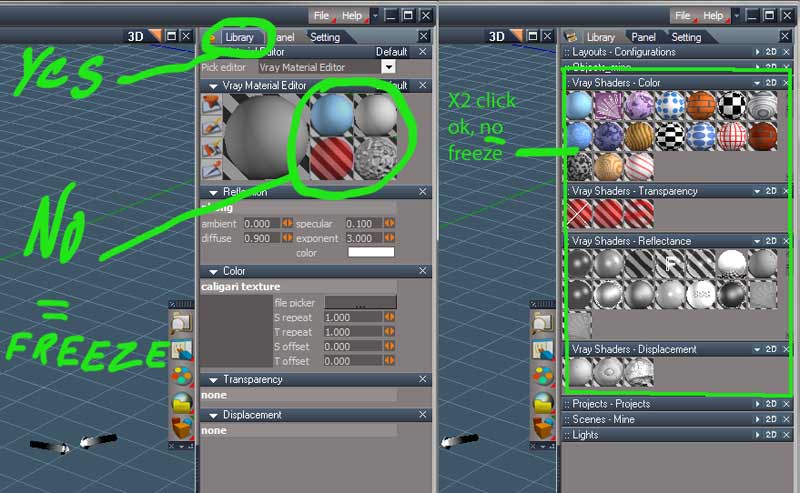
By 'standalone' do you mean the version that is Workspace only?
7.6 and vray here.
...
-
Steinie

- Captain
- Posts: 2958
- Joined: 21 May 2009, 17:38
- Type the number ten into the box: 10
Re: Truespace Standalone and Vray
Prodigy, Yes this was a known bug!
Posted by Jack Edwards at August 16, 2008, 8:49 am
If the library is loaded in the stack clicking on the ball will crash TS. This is a known bug.
"Steinie, you don't have to click on the balls to load the VRay shader libraries. Have you tried manually opening the shader libraries from the Library browser and using them that way as a work-around instead?
Keep in mind if you click on one of the balls while that library is open it will crash. This is because of a change that only allows one copy of a library to be open at a time. (The crashing part is a bug.) So don't click on any of the balls if you are opening the libraries manually.
Note this also applies to the bitmap library as well. "
http://www.awportals.com/archives/trues ... php?t=7027"
Posted by TomG at December 31, 2008, 6:29 am
Has a suggested work around in there too, which is to not click the spheres in the material editor if the VE Material Library or the Bitmap Library is open
"
Keep in mind if you click on one of the balls while that library is open it will crash. This is because of a change that only allows one copy of a library to be open at a time. (The crashing part is a bug.) So don't click on any of the balls if you are opening the libraries manually.
"
That one should let you avoid the crash
-
stan
- Master Chief Petty Officer
- Posts: 584
- Joined: 21 May 2009, 17:20
Re: Truespace Standalone and Vray
don't know if this will help..I get no crash in full beta761 ever. I fixed the code in the buttons to this:
Library2.AddLibraryWindowIntoTools('/Libraries/Main Library Place:Vray Shaders - Color')
Library2.AddLibraryWindowIntoTools('/Libraries/Main Library Place:Vray Shaders - Reflectance')
Library2.AddLibraryWindowIntoTools('/Libraries/Main Library Place:Vray Shaders - Transparency')
Library2.AddLibraryWindowIntoTools('/Libraries/Main Library Place:Vray Shaders - Displacement')
I remember sending a repaired mat editor to Steinie. It loads fine if a library is or isnt in stack as it opens outside of stack.. maybe the standalone can use similar code. HTH
-
Prodigy
- Site Admin
- Posts: 957
- Joined: 21 May 2009, 14:46
- Type the number ten into the box: 0
- Location: Uruguay
Re: Truespace Standalone and Vray
Thanks you very much guys, good info..
๑۩۞۩๑ prodigy ๑۩۞۩๑