I downloaded the .igs model for the Colt 1911 pistol frame from http://www.cncguns.com/downloads.html"
Loaded into tS 6.6 it has all these extra bits, like all the shapes you'd use to boolean subtract to leave the finished model. It renders like a normal model, all the extra stuff is hidden then.
Is there some way to flatten or otherwise convert this to a solid model?
Convert an .igs to a solid model?
-
Galane
- Chief Petty Officer
- Posts: 111
- Joined: 30 Aug 2009, 10:45
Convert an .igs to a solid model?
-
RAYMAN

- Captain
- Posts: 2547
- Joined: 21 May 2009, 18:56
Re: Convert an .igs to a solid model?
I dont have conversion pack so i can´t reproduce the behaviour of the model inside Ts6.6
but i loaded it into moi 3d and it comes in without any troubles.....
If you just need it for this project download the demo and use it for filetranslation........
It saves for 30 days but i guess you will like it....
Booleans are a trouble as I said in the thread devoted to that.
Peter
but i loaded it into moi 3d and it comes in without any troubles.....
If you just need it for this project download the demo and use it for filetranslation........
It saves for 30 days but i guess you will like it....
Booleans are a trouble as I said in the thread devoted to that.
Peter
- Attachments
-
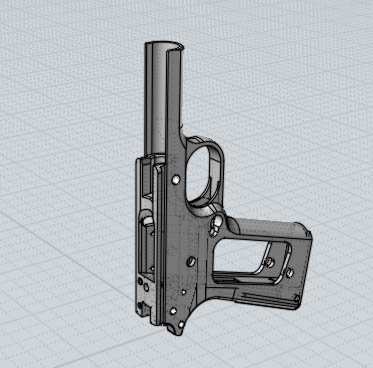
- gun.jpg (22.25 KiB) Viewed 3849 times
-
clintonman

- Captain
- Posts: 5659
- Joined: 21 May 2009, 21:08
- Type the number ten into the box: 0
- Location: California
Re: Convert an .igs to a solid model?
Here are some steps:
load the object
mesh collapse it - can get it here since not included in truespace 6.6:
http://web.archive.org/web/200601042113 ... ources.asp"
copy the mesh
flip the normals of the original or the copy
glue the original and copy together
mesh collapse the new group
point edit and use coincidence weld with smallest value possible to eliminate the extra points
if you have truespace7.6 the steps are similar
load the object and go to workspace
flatten history
add a cube and boolean subtract from the object - this makes it a single mesh object
point edit - select all faces, copy and flip them
select all and use heal vertices - coincident and the smallest value possible
load the object
mesh collapse it - can get it here since not included in truespace 6.6:
http://web.archive.org/web/200601042113 ... ources.asp"
copy the mesh
flip the normals of the original or the copy
glue the original and copy together
mesh collapse the new group
point edit and use coincidence weld with smallest value possible to eliminate the extra points
if you have truespace7.6 the steps are similar
load the object and go to workspace
flatten history
add a cube and boolean subtract from the object - this makes it a single mesh object
point edit - select all faces, copy and flip them
select all and use heal vertices - coincident and the smallest value possible
-
Galane
- Chief Petty Officer
- Posts: 111
- Joined: 30 Aug 2009, 10:45
Re: Convert an .igs to a solid model?
Trying to load mesh collapse in tS 6.6 gives me "The specified procedure could not be found". 
I'm still looking for the Conversion Pack 2.1 for tS 6.6. I installed version 2.0 with 6.5 then applied the 6.6 update. Could that have left some of the importers intact?
I tried 7.6 and 7.61b8, neither can load .igs files. In tS6 mode it shows them in the open dialog but says I need the conversion pack. Workspace's open dialog doesn't even show them. The mesh collapse plugin will load in Model side.
Since Conversion Pack 2.1 still has a use with 7.6, why hasn't it been released as a freebie too?
Edit: Clicking on point edit asks if I want to convert it to a polyhedron. That'll work for getting some dimensions, but it's still not a solid model.
Edit^2: I scaled up my Cosmo Gun so the trigger guard size is about the same as on that 1911. What's odd is I have everything set to meters and the 1911 model imported at a scale of 1" to 1 meter, going by the complete blueprints downloaded from the same site. I tried scaling up the model until the grip area of the frame was the same thickness as the 1911... way too large. I may have to modify that part some as I work on the "MD" version. MD = More Detail.
I'm still looking for the Conversion Pack 2.1 for tS 6.6. I installed version 2.0 with 6.5 then applied the 6.6 update. Could that have left some of the importers intact?
I tried 7.6 and 7.61b8, neither can load .igs files. In tS6 mode it shows them in the open dialog but says I need the conversion pack. Workspace's open dialog doesn't even show them. The mesh collapse plugin will load in Model side.
Since Conversion Pack 2.1 still has a use with 7.6, why hasn't it been released as a freebie too?
Edit: Clicking on point edit asks if I want to convert it to a polyhedron. That'll work for getting some dimensions, but it's still not a solid model.
Edit^2: I scaled up my Cosmo Gun so the trigger guard size is about the same as on that 1911. What's odd is I have everything set to meters and the 1911 model imported at a scale of 1" to 1 meter, going by the complete blueprints downloaded from the same site. I tried scaling up the model until the grip area of the frame was the same thickness as the 1911... way too large. I may have to modify that part some as I work on the "MD" version. MD = More Detail.
-
RAYMAN
- Captain
- Posts: 2547
- Joined: 21 May 2009, 18:56
Re: Convert an .igs to a solid model?
Yup without conversion pack ..... nada !
But thats why I showed you plan b which works well.....
and it doesnt hurt....
It does come in the right size there because you can tell the software what size to import.
But thats why I showed you plan b which works well.....
and it doesnt hurt....
It does come in the right size there because you can tell the software what size to import.