Ok, after my other posts I have decided to forgo TS5 and jump into TS 7. I am going though the tuts as best as i can and well have only got a little into the first one (the mouse tut). And the program is very very slow. and sometimes does not even move the planes. At present I only have to open. The mouse top view and the side view.
My computer is new and I thought I would have no problems with running this but uggg.
(quad core CPU - intel, 4 gigs ram, forget what vid card but runs games great and ugg my op sys is Vista 64).
Could i have some setting off.
Thanks
Very slow response
-
Vagabond
- Petty Officer Second Class
- Posts: 20
- Joined: 19 Sep 2009, 13:10
Very slow response
-
LeonRegis

- Captain
- Posts: 1946
- Joined: 18 Aug 2009, 17:36
- Type the number ten into the box: 0
- Location: Brazil/Earth/Orion Arm/Milky Way/4th Dimension/This Universe/Multiverse???/Singularity???
Re: Very slow response
Very strange, when I used TS in my Pentium 3 he gets slow when I editing multiple objects, but now with a core2due no problems, very strange. I'd like to know more details...
Cya
Cya
Be the change you want to see in the world. - Mohandas Gandhi
-
Vagabond
- Petty Officer Second Class
- Posts: 20
- Joined: 19 Sep 2009, 13:10
Re: Very slow response
let me know what sort of details i can provide. my major issue is when I change view from side to top to 3d etc it really goes slow.
-
Vagabond
- Petty Officer Second Class
- Posts: 20
- Joined: 19 Sep 2009, 13:10
Re: Very slow response
Update:
Ok something have improved. What did I do? Have not a clue. But it is still ultra slow on the 3d moving and panning around an object. And I do not even have that many objects. Still just on the mouse tut.
Ok something have improved. What did I do? Have not a clue. But it is still ultra slow on the 3d moving and panning around an object. And I do not even have that many objects. Still just on the mouse tut.
-
spacekdet

- Captain
- Posts: 1810
- Joined: 27 May 2009, 15:00
- Type the number ten into the box: 10
- Location: On the day shift at the Utility Muffin Research Kitchen
Re: Very slow response
A couple quick suggestions:
Turn the bridge off.
File/HW Settings: Reduce the settings to a simpler level.
Turn the bridge off.
File/HW Settings: Reduce the settings to a simpler level.
-
clintonman

- Captain
- Posts: 5659
- Joined: 21 May 2009, 21:08
- Type the number ten into the box: 0
- Location: California
Re: Very slow response
That is strange. Your computer is about 10 times faster than mine, so something is going on. Maybe it's your display mode.
Try switching between directx and opengl.
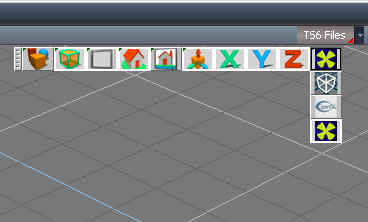
- openglDirectx.jpg (35.98 KiB) Viewed 6332 times
-
froo
- Captain
- Posts: 2554
- Joined: 22 May 2009, 12:13
Re: Very slow response
I think with 6.6 and Model side in 7.6 you have to enable hardware acceleration, though can't remember now.
-
Vagabond
- Petty Officer Second Class
- Posts: 20
- Joined: 19 Sep 2009, 13:10
Re: Very slow response
Just an update. I am really thinking it is yet another Vista issue and well it is Vista 64. Any way running it on my laptop XP 2 gigs of ram (CPU = ?) seems to be running ok. will keep posting if i figure it out on my main computer.
txs everyone and I will try the settings next. Hopefully when I get more familiar with TS7 I may figure it out.
txs everyone and I will try the settings next. Hopefully when I get more familiar with TS7 I may figure it out.
-
spacekdet
- Captain
- Posts: 1810
- Joined: 27 May 2009, 15:00
- Type the number ten into the box: 10
- Location: On the day shift at the Utility Muffin Research Kitchen
Re: Very slow response
Are you running tS in XP compatibility mode?
-
Cayenne
- Chief Petty Officer
- Posts: 119
- Joined: 03 Jun 2009, 20:05
- Type the number ten into the box: 0
- Location: U.K.
Re: Very slow response
Are your graphics drivers up to date, might be worth checking , I am using tS on several vista x64 without seeing any problems in the display speed .
I dont have any need to run in any compatibility modes.
I dont have any need to run in any compatibility modes.
-
Vagabond
- Petty Officer Second Class
- Posts: 20
- Joined: 19 Sep 2009, 13:10
Re: Very slow response
Great info. I will check both of those options when I get home. I did not know about the compatibility settings. Hopefully that is it and / or the drivers.
Thanks
Thanks
-
Breech Block

- Master Chief Petty Officer
- Posts: 482
- Joined: 13 Jun 2009, 20:31
Re: Very slow response
I have Vista 64 and it runs tS like a dream, both 7.x (model & workspace side) and 6.6. The only changes I have made to Vista since installing it are the standard patches through the update system and overiding the virtual memory settings. On the 2 occasions I have experience a couple of minor glitches, one time was due to updating my graphics driver and I simply reverted back again. And the other occasion was when, unknown to me at the time, my hard drive was on its way out. IMO, Vista is a far better OS for ts because you really do find yourself needing the full 4 Gigs of memory once you start to hit a high poly count or start to work with huge textures. HTH.

-
Vagabond
- Petty Officer Second Class
- Posts: 20
- Joined: 19 Sep 2009, 13:10
Re: Very slow response
Thanks everyone for trying to help. I tried spacekdet suggestion on the compatibility setting. I have not put it though a lot yet but it seems to be doing better.
-
Vagabond
- Petty Officer Second Class
- Posts: 20
- Joined: 19 Sep 2009, 13:10
Re: Very slow response
Ok that did not work out as well as I had hoped after i sweeped a block 2 time changing from one view to another was long.
Uggg I will keep looking till then I guess I need to work off my XP lappy.
Uggg I will keep looking till then I guess I need to work off my XP lappy.