Hi together, long time ago since my last post.
Today i would ask if there is a option in tS play a animation as a "stop motion" so that a played animation jumps from one key to the next key (or from pose to pose) without any interpolation. In MAYA this mode is called "Stepped Keys" and in other animation bundles there is also such a option.
I do animation with tS a long time and never found this and i always forgot to ask, so maybe there is a hidden option or maybe a plugin which can do this?
Thanks in advice...DD
Stepped Keys in tS?
-
DesignDevil

- Master Chief Petty Officer
- Posts: 500
- Joined: 22 May 2009, 08:52
- Type the number ten into the box: 0
- Location: Neuruppin, Germany, Earth.
Stepped Keys in tS?
I still use TrueSpace 6.6
Link: My Youtube Channel
Link: www.DesignDevil.de - Plugins, Tutorials and more about TrueSpace 6.6
Link: My Youtube Channel
Link: www.DesignDevil.de - Plugins, Tutorials and more about TrueSpace 6.6
-
froo
- Captain
- Posts: 2554
- Joined: 22 May 2009, 12:13
Re: Stepped Keys in tS?
On Model side, I'd have to check - I think you can change the interpolation mode to fit your needs DD.
-
DesignDevil
- Master Chief Petty Officer
- Posts: 500
- Joined: 22 May 2009, 08:52
- Type the number ten into the box: 0
- Location: Neuruppin, Germany, Earth.
Re: Stepped Keys in tS?
Wll, i try'd this...but this is not what i need.
It is not a question of interpolation because you can just switch between linear and curved. What i want is to play the animation WITHOUT any interpolation between the keyframes.
For example you have animated a cube sliding on the floor. Keyframe 0 is the start position, keyframe 40 is the end position. Whatever interpolation is active the cube will slide on the floor if you press play because it plays Frame 0,1,2,3,4,5,6...38,39,40.
What i need is a method that the cube will "jump" from the start to the end position because there are only 2 Keyframes. In other words that tS just play the Keyframes 0 and 40 (for this example).
Well, that sounds stupid and for this case it is but if you animate characters with the pose to pose method it is very useful.
It is not a question of interpolation because you can just switch between linear and curved. What i want is to play the animation WITHOUT any interpolation between the keyframes.
For example you have animated a cube sliding on the floor. Keyframe 0 is the start position, keyframe 40 is the end position. Whatever interpolation is active the cube will slide on the floor if you press play because it plays Frame 0,1,2,3,4,5,6...38,39,40.
What i need is a method that the cube will "jump" from the start to the end position because there are only 2 Keyframes. In other words that tS just play the Keyframes 0 and 40 (for this example).
Well, that sounds stupid and for this case it is but if you animate characters with the pose to pose method it is very useful.
I still use TrueSpace 6.6
Link: My Youtube Channel
Link: www.DesignDevil.de - Plugins, Tutorials and more about TrueSpace 6.6
Link: My Youtube Channel
Link: www.DesignDevil.de - Plugins, Tutorials and more about TrueSpace 6.6
-
Emmanuel

- Chief Warrant Officer
- Posts: 670
- Joined: 14 Jun 2009, 06:47
Re: Stepped Keys in tS?
I have been in this situation before : there was a machine to animate (a conveyor, part of a car assembly plant), and some parts were moving in stop motion.
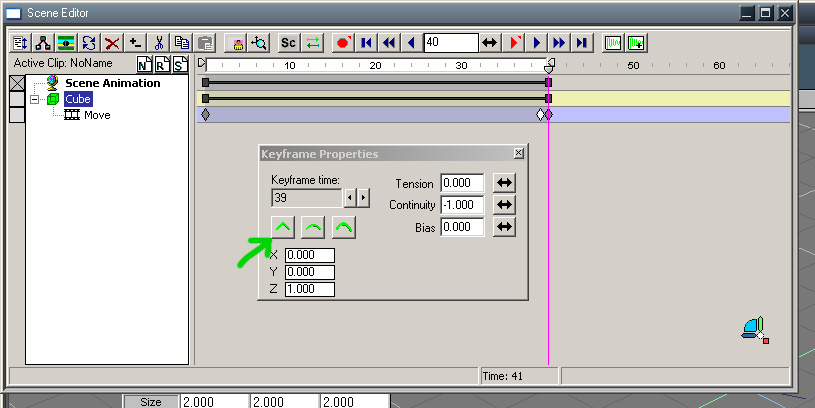
In your case of a cube moving at frame 40, my solution was to create 3 keyframes : the start key at 0, the end key at 40, and an other key at 39 where the object is at the exact same position as at frame 0.
Of course, I had to manually set a sharp edge (Continuity -1) in the Keyframe Properties of the KFE, for EACH of my keyframes. Because, unfortunately, Modeler's KFE does not allow to select all keyframes and set a given edge setting for all at once.
...a tsx idea, maybe
In your case of a cube moving at frame 40, my solution was to create 3 keyframes : the start key at 0, the end key at 40, and an other key at 39 where the object is at the exact same position as at frame 0.
Of course, I had to manually set a sharp edge (Continuity -1) in the Keyframe Properties of the KFE, for EACH of my keyframes. Because, unfortunately, Modeler's KFE does not allow to select all keyframes and set a given edge setting for all at once.
...a tsx idea, maybe
-
trueBlue

- Captain
- Posts: 5548
- Joined: 06 Jul 2009, 22:50
- Type the number ten into the box: 10
Re: Stepped Keys in tS?
You could use these commands hooked up to a Timer:
tSBridge.SuggestTSStateByAlias("NextKeyFrameButton")
tSBridge.SuggestTSStateByAlias("PrevKeyFrameButton")
Also the Bridge needs to be ON.
tSBridge.SuggestTSStateByAlias("NextKeyFrameButton")
tSBridge.SuggestTSStateByAlias("PrevKeyFrameButton")
Also the Bridge needs to be ON.
-
DesignDevil
- Master Chief Petty Officer
- Posts: 500
- Joined: 22 May 2009, 08:52
- Type the number ten into the box: 0
- Location: Neuruppin, Germany, Earth.
Re: Stepped Keys in tS?
@Emmanuel - that is not what i need because you simply change the interpolation mode from curved to linear. But if you now press PLAY the cube moves. What i want is a playmode where the animation jumps from one KF to the next as if you click on the "advance to next key frame" or "reverse to previous key frame" buttons.
I think a plugin could be a solution as trueBlue said - but just for tS 6.6
The idea for a plugin to modify more than one KF at the same time is also a good idea and i have on my neverending ToDo list such a point. A complete new KFE would be cool but this is a very hard job...
I think a plugin could be a solution as trueBlue said - but just for tS 6.6
The idea for a plugin to modify more than one KF at the same time is also a good idea and i have on my neverending ToDo list such a point. A complete new KFE would be cool but this is a very hard job...
I still use TrueSpace 6.6
Link: My Youtube Channel
Link: www.DesignDevil.de - Plugins, Tutorials and more about TrueSpace 6.6
Link: My Youtube Channel
Link: www.DesignDevil.de - Plugins, Tutorials and more about TrueSpace 6.6
-
froo
- Captain
- Posts: 2554
- Joined: 22 May 2009, 12:13
Re: Stepped Keys in tS?
Ok how about this:
Example:
cube at time 0: x = 0
cube at time 39: x = 0
cube at time 40; x = 1
Or, what you could do is:
render frame 0 40 times (frames 0 thru 39)
render frame 40 (this is the next keyframe) 40 times
repeat
seems like a plugin could do that: read each keyframe and render that keyframe multiple times, each time generating
a new filename for the bitmap images.
Example:
cube at time 0: x = 0
cube at time 39: x = 0
cube at time 40; x = 1
Or, what you could do is:
render frame 0 40 times (frames 0 thru 39)
render frame 40 (this is the next keyframe) 40 times
repeat
seems like a plugin could do that: read each keyframe and render that keyframe multiple times, each time generating
a new filename for the bitmap images.
-
DesignDevil
- Master Chief Petty Officer
- Posts: 500
- Joined: 22 May 2009, 08:52
- Type the number ten into the box: 0
- Location: Neuruppin, Germany, Earth.
Re: Stepped Keys in tS?
Thanks froo but we mistunderstand...
...i need this functionality if i create a animation not for rendering !!! That means a mode for the preview of a animation while creating it.
The background is a method called "pose to pose" animation where you define the extreme poses of your character along the animation. If you finished with posing you move these key poses to get a correct timing. After that you create the inbetween poses by defining more keyframes for the computed interpolation.
A good example could be facial animation (speaking):
Let's say you have a wave file and your character should say that. Step one would be to create a handful of extreme poses to show the spoken letters "A", "O", "I" etc.
Now you setup the correct timing for these poses in comparisation to the pose and the wave file (or the spoken word). That means you copy and paste your extremeposes onto the right positions on the timeline. Ok, now you have to check if the timing is correct and for a better view (without interpolation !!!! ) you need a play mode called "stepped keys". That means your playtime is normal (i.e. 24fps) but your preview just shows the extreme poses without any interpolation between the keyframes !!!
If you now sure all things are correct you can define the inbetweens to get a cool looking result for final rendering. For this you switch back to the normal interpolation mode spline or linear - whatever your animation needs.
I hope that this will bring light into this case.
Another example is the layout version of my animation "magic". Well this is rendered - you have to imagine that i want to see exactly this in tS while press the "play" button.
...i need this functionality if i create a animation not for rendering !!! That means a mode for the preview of a animation while creating it.
The background is a method called "pose to pose" animation where you define the extreme poses of your character along the animation. If you finished with posing you move these key poses to get a correct timing. After that you create the inbetween poses by defining more keyframes for the computed interpolation.
A good example could be facial animation (speaking):
Let's say you have a wave file and your character should say that. Step one would be to create a handful of extreme poses to show the spoken letters "A", "O", "I" etc.
Now you setup the correct timing for these poses in comparisation to the pose and the wave file (or the spoken word). That means you copy and paste your extremeposes onto the right positions on the timeline. Ok, now you have to check if the timing is correct and for a better view (without interpolation !!!! ) you need a play mode called "stepped keys". That means your playtime is normal (i.e. 24fps) but your preview just shows the extreme poses without any interpolation between the keyframes !!!
If you now sure all things are correct you can define the inbetweens to get a cool looking result for final rendering. For this you switch back to the normal interpolation mode spline or linear - whatever your animation needs.
I hope that this will bring light into this case.
Another example is the layout version of my animation "magic". Well this is rendered - you have to imagine that i want to see exactly this in tS while press the "play" button.
I still use TrueSpace 6.6
Link: My Youtube Channel
Link: www.DesignDevil.de - Plugins, Tutorials and more about TrueSpace 6.6
Link: My Youtube Channel
Link: www.DesignDevil.de - Plugins, Tutorials and more about TrueSpace 6.6
-
Draise

- Captain
- Posts: 3200
- Joined: 21 Sep 2009, 19:33
- Type the number ten into the box: 0
- Location: Bogota, Colombia
Re: Stepped Keys in tS?
In worspace side (might make things different) you can select all keyframes in the FCurve animation editor that you wish to interpolate into poses, change the interpolation to "Constant Start Value" and you will get your poses where there are keyframes. You can also change it to Constant End Values, depending on how you want the keyframes to influence the past or future.

1. Select all curve keyframes of all the attributes you want. (you may have to change the view to positive and negative frame values to select them all)
2. Right click on them to bring the menu.
3. Select Interpolation -> Constant End Values or vice versa
The result will look like the below, thus giving you keyframed poses due to constant curve values

When you press play, you will get your poses.
Animation is simple and powerful on the workspace side. The only thing lacking in it is a good retiming ripple/ripple function, but you can easily use clips to retime and ripple. It is also simplified, so you can focus on the animation over anything else, annnnd... but it is simplified. The bones is buggy, but I am working on finding the bugs to create some guidelines to make it maneagable, because it can work.
Hope that helps!
1. Select all curve keyframes of all the attributes you want. (you may have to change the view to positive and negative frame values to select them all)
2. Right click on them to bring the menu.
3. Select Interpolation -> Constant End Values or vice versa
The result will look like the below, thus giving you keyframed poses due to constant curve values
When you press play, you will get your poses.
Animation is simple and powerful on the workspace side. The only thing lacking in it is a good retiming ripple/ripple function, but you can easily use clips to retime and ripple. It is also simplified, so you can focus on the animation over anything else, annnnd... but it is simplified. The bones is buggy, but I am working on finding the bugs to create some guidelines to make it maneagable, because it can work.
Hope that helps!
-
Draise
- Captain
- Posts: 3200
- Joined: 21 Sep 2009, 19:33
- Type the number ten into the box: 0
- Location: Bogota, Colombia
Re: Stepped Keys in tS?
Also, I recommend Papagayo Lipsyncer to do your lipsyncing.
Website

It is very easy, reads the sound file and does it for you after you write the text, then you can modify it to desire. Once you are done, you can export a spreasheet with the words all set, and then in the workspace, you can throw in shape clips to where you need to put it.
To play audio on the workspace side when you hit play to test the lipsync, you can follow this thread.
Website
It is very easy, reads the sound file and does it for you after you write the text, then you can modify it to desire. Once you are done, you can export a spreasheet with the words all set, and then in the workspace, you can throw in shape clips to where you need to put it.
To play audio on the workspace side when you hit play to test the lipsync, you can follow this thread.
-
DesignDevil
- Master Chief Petty Officer
- Posts: 500
- Joined: 22 May 2009, 08:52
- Type the number ten into the box: 0
- Location: Neuruppin, Germany, Earth.
Re: Stepped Keys in tS?
Yep i think this is exactly what i'm looking for - to bad that this is not available in tS6.6 because i don't use the 7.6 version. On the workspace side i had not the possibility to use MotionStudio.
I still use TrueSpace 6.6
Link: My Youtube Channel
Link: www.DesignDevil.de - Plugins, Tutorials and more about TrueSpace 6.6
Link: My Youtube Channel
Link: www.DesignDevil.de - Plugins, Tutorials and more about TrueSpace 6.6
-
Draise
- Captain
- Posts: 3200
- Joined: 21 Sep 2009, 19:33
- Type the number ten into the box: 0
- Location: Bogota, Colombia
Re: Stepped Keys in tS?
Bummer...
-
bitkar

- Captain
- Posts: 2089
- Joined: 16 Mar 2010, 07:14
- Type the number ten into the box: 0
- Location: Czech Republic
Re: Stepped Keys in tS?
sorry if iam out, i didnt want to read everything... my two solutions:
1. make double keyframes, just copy the made keyframe once more to the next frame
2. better is to make animation cosisting only of keyframes placed right beside each other. Make a short image sequence and make it longer then in some video editor app where you can make one frame become 20 frames. No need for special feature.
1. make double keyframes, just copy the made keyframe once more to the next frame
2. better is to make animation cosisting only of keyframes placed right beside each other. Make a short image sequence and make it longer then in some video editor app where you can make one frame become 20 frames. No need for special feature.
Michal aka bitkar
tS freak since tS2 (1998) and forever (tS7.61 modeler)
tS freak since tS2 (1998) and forever (tS7.61 modeler)
-
DesignDevil
- Master Chief Petty Officer
- Posts: 500
- Joined: 22 May 2009, 08:52
- Type the number ten into the box: 0
- Location: Neuruppin, Germany, Earth.
Re: Stepped Keys in tS?
jou should do itsorry if iam out, i didnt want to read everything...
anyhow ... thanks for this tipp but - again - i have to say that i don't search for a solution how i create a rendered animation! I need this for the creation process while i'm develop the animation for a better preview.So far as we found out it is not possible in tS6.6 (or modeler side). The worksapce has this possibility (and other animation packages also) but in 6.6 just a plugin with a timer could do the job. The main problem is that i do the most of my animation work with MotionStudio and this + workspace don't work. To bad

I still use TrueSpace 6.6
Link: My Youtube Channel
Link: www.DesignDevil.de - Plugins, Tutorials and more about TrueSpace 6.6
Link: My Youtube Channel
Link: www.DesignDevil.de - Plugins, Tutorials and more about TrueSpace 6.6
-
Cayenne
- Chief Petty Officer
- Posts: 119
- Joined: 03 Jun 2009, 20:05
- Type the number ten into the box: 0
- Location: U.K.
Re: Stepped Keys in tS?
I don't know too much about python and 6.6 script editor and what you really need, but it might be possible to write some python code that runs in 6.6 script editor and does what you need.
-
DesignDevil
- Master Chief Petty Officer
- Posts: 500
- Joined: 22 May 2009, 08:52
- Type the number ten into the box: 0
- Location: Neuruppin, Germany, Earth.
Re: Stepped Keys in tS?
Hmm, cool idea - could be possible - but for me it is easier and faster to write this as a plugin before i start to learn python.
I still use TrueSpace 6.6
Link: My Youtube Channel
Link: www.DesignDevil.de - Plugins, Tutorials and more about TrueSpace 6.6
Link: My Youtube Channel
Link: www.DesignDevil.de - Plugins, Tutorials and more about TrueSpace 6.6
-
frank
- Senior Chief Petty Officer
- Posts: 161
- Joined: 28 May 2009, 13:25
Re: Stepped Keys in tS?
I just want to add, this has been a feature I've desired in tS for quite some time. Or at least, ever since I first read Keith Lango's Pose to Pose Pop-Through Animation Article.
Setting double-keys at keyframe points to eliminate the interpolation and achieve a stepped/held key isn't the most fun. Gets kinda cluttered fast. LOL!
Glad to see folks discussing this!
Setting double-keys at keyframe points to eliminate the interpolation and achieve a stepped/held key isn't the most fun. Gets kinda cluttered fast. LOL!
Glad to see folks discussing this!
-
Emmanuel
- Chief Warrant Officer
- Posts: 670
- Joined: 14 Jun 2009, 06:47
Re: Stepped Keys in tS?
Good article. Thanks for the link Franckfrank wrote: Or at least, ever since I first read Keith Lango's Pose to Pose Pop-Through Animation Article.

-
BNG

- Chief Warrant Officer
- Posts: 684
- Joined: 16 Oct 2009, 03:26
- Type the number ten into the box: 0
- Location: Texas
Re: Stepped Keys in tS?
Perhaps you could try a new clip for every frame in the animation? You may have to play around with several options to achieve the result you want. Froo just trying to be helpful there's no need to get upset DD.
Casual Truespace 3D modeling hobbyist. My Truespace blog and simple 3d Modeling Tutorials for Casual Model Makers.
-
trueBlue
- Captain
- Posts: 5548
- Joined: 06 Jul 2009, 22:50
- Type the number ten into the box: 10
Re: Stepped Keys in tS?
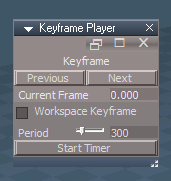
Here is a Keyframe Player that plays Forward and Reverse Keyframes within tS7... Model and Workspace.frank wrote:I just want to add, this has been a feature I've desired in tS for quite some time. Or at least, ever since I first read Keith Lango's Pose to Pose Pop-Through Animation Article.
Setting double-keys at keyframe points to eliminate the interpolation and achieve a stepped/held key isn't the most fun. Gets kinda cluttered fast. LOL!
Glad to see folks discussing this!

- Capture.PNG (22.59 KiB) Viewed 8124 times
-
Emmanuel
- Chief Warrant Officer
- Posts: 670
- Joined: 14 Jun 2009, 06:47
Re: Stepped Keys in tS?
Thank you Trueblue !
-
trueBlue
- Captain
- Posts: 5548
- Joined: 06 Jul 2009, 22:50
- Type the number ten into the box: 10
Re: Stepped Keys in tS?
Updated this Keyframe Player
I eliminated the Reverse 'Previous Keyframe' in the timer script because Model's Play 'Animation' does not seem to stop playing, it just keeps looping
Seems to ignore the Preference's Reset
The timer will stop automatically when the Timer's Frame attribute equals the last Keyframe
This is mostly for Model Keyframed objects but if you Check - Workspace Keyframe, it will also work in Workspace
I eliminated the Reverse 'Previous Keyframe' in the timer script because Model's Play 'Animation' does not seem to stop playing, it just keeps looping
Seems to ignore the Preference's Reset
The timer will stop automatically when the Timer's Frame attribute equals the last Keyframe
This is mostly for Model Keyframed objects but if you Check - Workspace Keyframe, it will also work in Workspace
- Keyframe Player panel.png (8.67 KiB) Viewed 2391 times
- Attachments
-
- Keyframe Player.RsObj
- (64.18 KiB) Downloaded 107 times