Hi Guys,
I am hoping someone can help me.
I had Truespace a few years ago but never did anything with it. Last week I downloaded the Truespace file tS76.exe.
I installed the programme and started tinkering with it trying to learn the programme.
I started getting a few tutorial videos and watching them but I noticed a couple of things
1/ In one video the instructor was showing how to install "Layerz" add on, in his video in the video his Truespace programme in the "Library" menu he had a panel called "Scripts" (or something close to that name) I don't have that panel in my Library menu.
2/ Another instructor was showing how to use the "MotionStudioPro.tsx add on, he showed how he prefers cubes on his Motion Studio bones not the standard spheres.
I followed along
a/ create a new scene
b/ create a cube
c/ save the cube as an object = file - save as - object - JOINTBARS.cob
when I got to the save part in my file menu I don't have the "save as" option so I couldn't save it as a cob file because the cob was not there in the drop down options.
I pressed the Truespace 6 option which I assumes reverts the programme back the version 6.6, in there was the "save as" option and I managed to save it as the JIONTBARS.cob in the tsx folder as described.
But when I reverted back to V 7 opened the Motion Studio option, created a bone the spheres were there not cubes.
So my questions are
What am I doing wrong?
Do I need to get a specific add on ?
Have I got the very latest and last version of Truespace ?
or
Where can I get the very latest and last version of Truespace please ? so I can at least have the options I see in the tutorial vids and beon the same page so to speak.
I would really prefer not to uninstall and head towards Blender
Thanks in advance
Update.
I went to the "General Discussion" section in this forum and downloaded the Truespace Version 7.61 Beta 8, but when I ran it I have the same issues as before, I uninstalled version 7.6 and re opened the latest version, still no joy = No scripts panel in the library menu and no save as option.
Have I got the right version
-
foff44
- Petty Officer Second Class
- Posts: 30
- Joined: 23 Jan 2014, 08:26
- Type the number ten into the box: 10
Have I got the right version
-
Draise

- Captain
- Posts: 3200
- Joined: 21 Sep 2009, 19:33
- Type the number ten into the box: 0
- Location: Bogota, Colombia
Re: Have I got the right version
Hi there! Glad you want to try out ts!
The best and most recent version is ts 7.61beta8 with modelside (update 3)
bare in mind if you have the rosette version, it won't have as many save options if any at all.
The majority of the save options will be located in the modelside, with limited options in the workspace side.
Many libraries have different names to previous versions, so try to ask around here in the forum and we'll point it out for you. Everything is very customizable.
What script library are you looking for exactly? I'm also not clear as to what you want to do with the bones...
The best and most recent version is ts 7.61beta8 with modelside (update 3)
bare in mind if you have the rosette version, it won't have as many save options if any at all.
The majority of the save options will be located in the modelside, with limited options in the workspace side.
Many libraries have different names to previous versions, so try to ask around here in the forum and we'll point it out for you. Everything is very customizable.
What script library are you looking for exactly? I'm also not clear as to what you want to do with the bones...
-
foff44
- Petty Officer Second Class
- Posts: 30
- Joined: 23 Jan 2014, 08:26
- Type the number ten into the box: 10
Re: Have I got the right version
G'day CaptainDraise wrote:Hi there! Glad you want to try out ts!
The best and most recent version is ts 7.61beta8 with modelside (update 3)
bare in mind if you have the rosette version, it won't have as many save options if any at all.
The majority of the save options will be located in the modelside, with limited options in the workspace side.
Many libraries have different names to previous versions, so try to ask around here in the forum and we'll point it out for you. Everything is very customizable.
What script library are you looking for exactly? I'm also not clear as to what you want to do with the bones...
I might just start with 1 problem at a time, I am new to the programme so am just stumbling through it at the moment.
The file I downloaded was tS61B8
I installed the programme and checked the version = Help - About - "trueSpace7.6, Version: Beta 7.61
I am in the Model Side I checked the File menu items, - New Scene - Load - Save - Recent Files - HW Settings - Exit, as you can see there is no "Save As" option
When I change to the Workspace Side The work window changes but the side bar stays the same as in the Model Side with the Library and it relevant panels.
So the questions are: Why don't I have the "Save as" option?
Do I have the latest version or do I need to get an update?
Also is it normal when you change from the Model Side to the Workspace Side that only the work window changes ?
Again and as always any and all help is greatly appreciated.
-
clintonman

- Captain
- Posts: 5659
- Joined: 21 May 2009, 21:08
- Type the number ten into the box: 0
- Location: California
Re: Have I got the right version
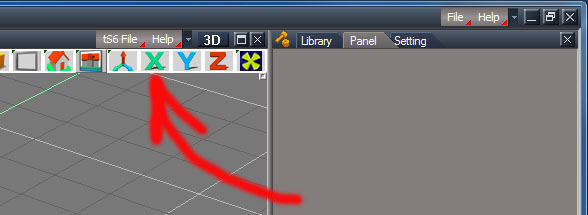
tS6File - New - Load - Save - Save-As... etc.
-
trueBlue

- Captain
- Posts: 5548
- Joined: 06 Jul 2009, 22:50
- Type the number ten into the box: 10
Re: Have I got the right version
There is an Unofficial Update that fixes a few issues in tS761B8
viewforum.php?f=55"
viewforum.php?f=55"
-
foff44
- Petty Officer Second Class
- Posts: 30
- Joined: 23 Jan 2014, 08:26
- Type the number ten into the box: 10
Re: Have I got the right version
clintonman: Thanks for the heads up, I found it and managed to make the cubes for the bone and it worked, I never looked at that particular menu.
trueBlue: Thanks for the link, I got it downloaded and installed it.
Draise: I'm also not clear as to what you want to do with the bones - The reason for the bones is: - in the video for Motion Studio Pro used for motion in trueSpace (which is why I wanted to get into the programme is to do some modelling and animation) the default bone ends are spheres and spheres have a lot more geometry, so he suggests changing the spheres to cubes to reduce the weight of the model.
Stay tuned guys, I am trying a little modelling at the moment and am just struggling a little with the navigation.
Thanks again
trueBlue: Thanks for the link, I got it downloaded and installed it.
Draise: I'm also not clear as to what you want to do with the bones - The reason for the bones is: - in the video for Motion Studio Pro used for motion in trueSpace (which is why I wanted to get into the programme is to do some modelling and animation) the default bone ends are spheres and spheres have a lot more geometry, so he suggests changing the spheres to cubes to reduce the weight of the model.
Stay tuned guys, I am trying a little modelling at the moment and am just struggling a little with the navigation.
Thanks again
-
BNG

- Chief Warrant Officer
- Posts: 684
- Joined: 16 Oct 2009, 03:26
- Type the number ten into the box: 0
- Location: Texas
Re: Have I got the right version
Always remember that TSX is related to the model (Truespace6) side of TS 7.6X and RSX is specific to 7.6X. You'll need to identify which version the tutorial was written for. Truespace 7.6, 7.61 both include the Truespace6 version of TS with it's older Caligari modeling interface, i.e., the package is actually 2 different modeling software versions bundle together so to speak.
There are actually two sets of File menu options. The very top one is specific to 7.6X and the lower one is specific to the older Truespace6 model side of TS. I actually prefer the older Truespace6 model side personally, and I highly suggest starting with that version of TS and then move up to the newer 7.6X work space side once you're comfortable with it. Leroy.
There are actually two sets of File menu options. The very top one is specific to 7.6X and the lower one is specific to the older Truespace6 model side of TS. I actually prefer the older Truespace6 model side personally, and I highly suggest starting with that version of TS and then move up to the newer 7.6X work space side once you're comfortable with it. Leroy.
Casual Truespace 3D modeling hobbyist. My Truespace blog and simple 3d Modeling Tutorials for Casual Model Makers.
-
foff44
- Petty Officer Second Class
- Posts: 30
- Joined: 23 Jan 2014, 08:26
- Type the number ten into the box: 10
Re: Have I got the right version
Hey Leroy.BNG wrote:Always remember that TSX is related to the model (Truespace6) side of TS 7.6X and RSX is specific to 7.6X. You'll need to identify which version the tutorial was written for. Truespace 7.6, 7.61 both include the Truespace6 version of TS with it's older Caligari modeling interface, i.e., the package is actually 2 different modeling software versions bundle together so to speak.
There are actually two sets of File menu options. The very top one is specific to 7.6X and the lower one is specific to the older Truespace6 model side of TS. I actually prefer the older Truespace6 model side personally, and I highly suggest starting with that version of TS and then move up to the newer 7.6X work space side once you're comfortable with it. Leroy.
I will follow your suggestion, am I right in assuming that I click the "trueSpace6" tab at the top of the main window and that will put me trueSpace6 mode?
Also your My Truespace blog and simple 3d Modeling Tutorials for Casual Model Makers. link doesn't seem to be working.
Update: The link works in IE but doesn't seem to work in Google Chrome..
-
Steinie

- Captain
- Posts: 2958
- Joined: 21 May 2009, 17:38
- Type the number ten into the box: 10
Re: Have I got the right version
Fof44,
Just in case you missed this thread it will clear up a few questions.
vi ... =23&t=2146"
It will answer SOME of your questions but not all. We are here for those questions. Most users here
tend to stick to one version ( Model vs. WorkSpace) of trueSpace and their work is outstanding. Once you get
the hang of one side then you can start adventuring over to the other side.
I tend to stick to WorkSpace because I have the real-time rendering engine and VRay which I purchased. Your options
are much bigger sticking to the Model side for now.
(I occasionally use the bend tool and Froo's Obj Importer on the Model side then bring the object over to the WorkSpace side to continue.)
I'm glad you want to give trueSpace a shot. It is not for everybody but those of us that use it Love it!
Just in case you missed this thread it will clear up a few questions.
vi ... =23&t=2146"
It will answer SOME of your questions but not all. We are here for those questions. Most users here
tend to stick to one version ( Model vs. WorkSpace) of trueSpace and their work is outstanding. Once you get
the hang of one side then you can start adventuring over to the other side.
I tend to stick to WorkSpace because I have the real-time rendering engine and VRay which I purchased. Your options
are much bigger sticking to the Model side for now.
(I occasionally use the bend tool and Froo's Obj Importer on the Model side then bring the object over to the WorkSpace side to continue.)
I'm glad you want to give trueSpace a shot. It is not for everybody but those of us that use it Love it!
-
trueBlue
- Captain
- Posts: 5548
- Joined: 06 Jul 2009, 22:50
- Type the number ten into the box: 10
Re: Have I got the right version

- Capture.PNG (9.08 KiB) Viewed 5340 times
-
foff44
- Petty Officer Second Class
- Posts: 30
- Joined: 23 Jan 2014, 08:26
- Type the number ten into the box: 10
Re: Have I got the right version
Steinie wrote:Fof44,
Just in case you missed this thread it will clear up a few questions.
vi ... =23&t=2146"
It will answer SOME of your questions but not all. We are here for those questions. Most users here
tend to stick to one version ( Model vs. WorkSpace) of trueSpace and their work is outstanding. Once you get
the hang of one side then you can start adventuring over to the other side.
I tend to stick to WorkSpace because I have the real-time rendering engine and VRay which I purchased. Your options
are much bigger sticking to the Model side for now.
(I occasionally use the bend tool and Froo's Obj Importer on the Model side then bring the object over to the WorkSpace side to continue.)
I'm glad you want to give trueSpace a shot. It is not for everybody but those of us that use it Love it!
Hey Steinie
I am off to that link now, I do find myself a lot more in the Model Side as it looks more familiar (like other 3d programmes I have tinkered with)
I do have a few questions but will always try to nut them out myself before I ask in the forums.
Again thank you for your help.
-
foff44
- Petty Officer Second Class
- Posts: 30
- Joined: 23 Jan 2014, 08:26
- Type the number ten into the box: 10
Re: Have I got the right version
G'day trueBlue,trueBlue wrote:
This will be the dumbest and hopefully the only dumb question I need to ask, but,
How do I know when I am in version 6.6.
I click on the the trueSpace6 tab, the screen goes black and white, then comes good again and the only change I see is that the Library, Panel, and Settings panels on the right hand side disappears.
-
trueBlue
- Captain
- Posts: 5548
- Joined: 06 Jul 2009, 22:50
- Type the number ten into the box: 10
Re: Have I got the right version
Select the Model tab (when selected the tab turns gray) for an updated version of trueSpace 6.6 and Workspace for the trueSpace 7 version. The tabs at the top are saved layouts and the trueSpace6 layout is a modified layout that somewhat hides (closed, expandable windows) the Workspace tools and panels.
Here is a video explaining the Bridge that connects the Model(tS6) with the Workspace(tS7).
http://www.youtube.com/watch?v=D_JtLkHQZkg"
From the same user you will find several videoes/tutorials about Model(tS6) and Workspace(tS7).
http://www.youtube.com/user/truespacefree/videos"
Here is a video explaining the Bridge that connects the Model(tS6) with the Workspace(tS7).
http://www.youtube.com/watch?v=D_JtLkHQZkg"
From the same user you will find several videoes/tutorials about Model(tS6) and Workspace(tS7).
http://www.youtube.com/user/truespacefree/videos"
-
BNG
- Chief Warrant Officer
- Posts: 684
- Joined: 16 Oct 2009, 03:26
- Type the number ten into the box: 0
- Location: Texas
Re: Have I got the right version
I would say that the Model tab and Truespace6 tab are the 6.6 version. However, using the Truespace6 tab option disables some parts of the Workspace side of TS. In particular when you wish to use the newer RSX based TS plugin addons and keep them loaded when you close the software and open it again for future modeling projects.
A safe bet would be to select the Default tab as both versions of TS are enabled then just select the Model tab when you want to use the 6.6 version. I know it sounds a bit odd but once you get over these oddities you should find Truespace quite easy to navigate and use without a lot of problems. Leroy.
A safe bet would be to select the Default tab as both versions of TS are enabled then just select the Model tab when you want to use the 6.6 version. I know it sounds a bit odd but once you get over these oddities you should find Truespace quite easy to navigate and use without a lot of problems. Leroy.
Casual Truespace 3D modeling hobbyist. My Truespace blog and simple 3d Modeling Tutorials for Casual Model Makers.
-
trueBlue
- Captain
- Posts: 5548
- Joined: 06 Jul 2009, 22:50
- Type the number ten into the box: 10
Re: Have I got the right version
BNG! Everything you said here is wrong. As said about the trueSpace6 layout, the Workspace tools and panels are still there.BNG wrote:I would say that the Model tab and Truespace6 tab are the 6.6 version. However, using the Truespace6 tab option disables some parts of the Workspace side of TS. In particular when you wish to use the newer RSX based TS plugin addons and keep them loaded when you close the software and open it again for future modeling projects.
A safe bet would be to select the Default tab as both versions of TS are enabled then just select the Model tab when you want to use the 6.6 version. I know it sounds a bit odd but once you get over these oddities you should find Truespace quite easy to navigate and use without a lot of problems. Leroy.
The trueSpace6 layout looks like the Default layout when you expand the windows, as shown below."the trueSpace6 layout is a modified layout that somewhat hides (closed, expandable windows) the Workspace tools and panels"
Please do not offer advice unless you really know what you are talking about.
- Attachments
-
