As said here:
http://forums1.caligari.com/truespace/s ... stcount=19
It should be possible to make a floating panel of custom made objects.
Is this possible for script objects and also in Trueplay, how to do?
Floating panels
-
Wigand
- Senior Chief Petty Officer
- Posts: 204
- Joined: 21 May 2009, 17:38
Floating panels
-
trueBlue

- Captain
- Posts: 5548
- Joined: 06 Jul 2009, 22:50
- Type the number ten into the box: 10
Re: Floating panels
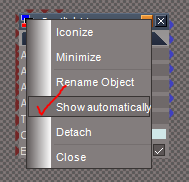
New to truePlay2 is the Stack.
So now when you enable the panel to Show Automatically it will show in the Stack/Panels when the scene loads in truePlay2.
So now when you enable the panel to Show Automatically it will show in the Stack/Panels when the scene loads in truePlay2.
- Attachments
-
- Capture.PNG (7.2 KiB) Viewed 2876 times
-
trueBlue
- Captain
- Posts: 5548
- Joined: 06 Jul 2009, 22:50
- Type the number ten into the box: 10
Re: Floating panels
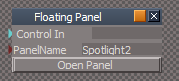
Here is another example how to show a panel in truePlay2 and trueSpace761 when the scene loads.
Note in the script where I supply the current scene name. This makes it versatile and fail safe in any given scene. I have also included a PanelName attribute where you can enter the name of the panel you want to show. Be sure to use the Enter key after supplying the name. Also note that this panel is set to Run Automatically.
Note in the script where I supply the current scene name. This makes it versatile and fail safe in any given scene. I have also included a PanelName attribute where you can enter the name of the panel you want to show. Be sure to use the Enter key after supplying the name. Also note that this panel is set to Run Automatically.
- Attachments
-
- Capture.PNG (3.2 KiB) Viewed 2875 times
-
- New Compressed (zipped) Folder8159.zip
- (3.91 MiB) Downloaded 265 times
-
Wigand
- Senior Chief Petty Officer
- Posts: 204
- Joined: 21 May 2009, 17:38
Re: Floating panels
Thank you trueBlue, I will test your objects.
What is about the buttons I read, is it the same function to show them?
What is about the buttons I read, is it the same function to show them?