TS 7.6
I can't get the Virtualight control panel to appear. I've used VL before but now I don't know how I got the panel. The manual says to right click on any render button but that does nothing. I have selected the VL tsr in the preferences.
Virtualight control panel not appear.
-
Finis

- Captain
- Posts: 5410
- Joined: 21 May 2009, 18:26
- Type the number ten into the box: 0
- Location: America!
Virtualight control panel not appear.
I prefer dangerous freedom over peaceful servitude. -- Thomas Jefferson/Jean Jacques Rousseau
-
RAYMAN

- Captain
- Posts: 2547
- Joined: 21 May 2009, 18:56
Re: Virtualight control panel not appear.
Finis did you go to preferences and select Virtuallight because if you then rightclick the render button a panel jumps open with the virtuallight settings..
Peter
Peter
-
Finis
- Captain
- Posts: 5410
- Joined: 21 May 2009, 18:26
- Type the number ten into the box: 0
- Location: America!
Re: Virtualight control panel not appear.
"I have selected the VL tsr in the preferences."RAYMAN wrote:Finis did you go to preferences and select Virtuallight because if you then rightclick the render button a panel jumps open with the virtuallight settings..
Peter
No Rayman. That doesn't happen. That is the problem: what should happen doesn't.
I prefer dangerous freedom over peaceful servitude. -- Thomas Jefferson/Jean Jacques Rousseau
-
LeonRegis

- Captain
- Posts: 1946
- Joined: 18 Aug 2009, 17:36
- Type the number ten into the box: 0
- Location: Brazil/Earth/Orion Arm/Milky Way/4th Dimension/This Universe/Multiverse???/Singularity???
Re: Virtualight control panel not appear.
The panel appear on the panel tab on that stack so I think it is from workspace...
- Attachments
-
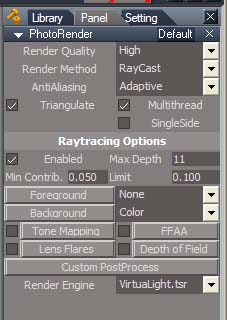
- help.jpg (31.87 KiB) Viewed 4265 times
Be the change you want to see in the world. - Mohandas Gandhi
-
RAYMAN
- Captain
- Posts: 2547
- Joined: 21 May 2009, 18:56
Re: Virtualight control panel not appear.
When things dont do what they should do reset Truespace !Finis wrote:"I have selected the VL tsr in the preferences."RAYMAN wrote:Finis did you go to preferences and select Virtuallight because if you then rightclick the render button a panel jumps open with the virtuallight settings..
Peter
No Rayman. That doesn't happen. That is the problem: what should happen doesn't.
Thats what I would do in that case. Its handy to use a ctx file with evrything installed rather then a fresh one....
-
Finis
- Captain
- Posts: 5410
- Joined: 21 May 2009, 18:26
- Type the number ten into the box: 0
- Location: America!
Re: Virtualight control panel not appear.
Thanks Rayman. I deleted default.ctx but the panel still won't appear.
Leon, I haven't seen the panel you wrote about. I didn't use it when VL worked before. I'll look at it and see what can be done there.
Leon, I haven't seen the panel you wrote about. I didn't use it when VL worked before. I'll look at it and see what can be done there.
I prefer dangerous freedom over peaceful servitude. -- Thomas Jefferson/Jean Jacques Rousseau
-
stan
- Master Chief Petty Officer
- Posts: 584
- Joined: 21 May 2009, 17:20
Re: Virtualight control panel not appear.
-
Finis
- Captain
- Posts: 5410
- Joined: 21 May 2009, 18:26
- Type the number ten into the box: 0
- Location: America!
Re: Virtualight control panel not appear.
Stan, that fixed it. I had to do the registry fix. I saved the info in case needed again.
Thanks Stan and everyone.
Thanks Stan and everyone.
I prefer dangerous freedom over peaceful servitude. -- Thomas Jefferson/Jean Jacques Rousseau